
The Model Context Protocol (MCP) is the open standard that lets AI assistants and agents connect to your systems — files, databases, APIs, and internal tools — through one consistent, controllable interface. Software Depo designs and builds MCP servers that act as secure gateways between AI and your infrastructure.
MCP Server Development
Custom MCP servers exposing exactly the capabilities you choose: read a record, query a database, trigger a process, file a ticket — nothing more. We build against the current protocol specification with typed tools, resource endpoints, and clean error behavior.
Connectors and Integrations
MCP connectors for CRMs, ERPs, document stores, ticketing, and proprietary line-of-business systems — so Claude, Codex, Copilot, and custom agents can work with the systems you already run, under the permissions you define.
Security Comes First
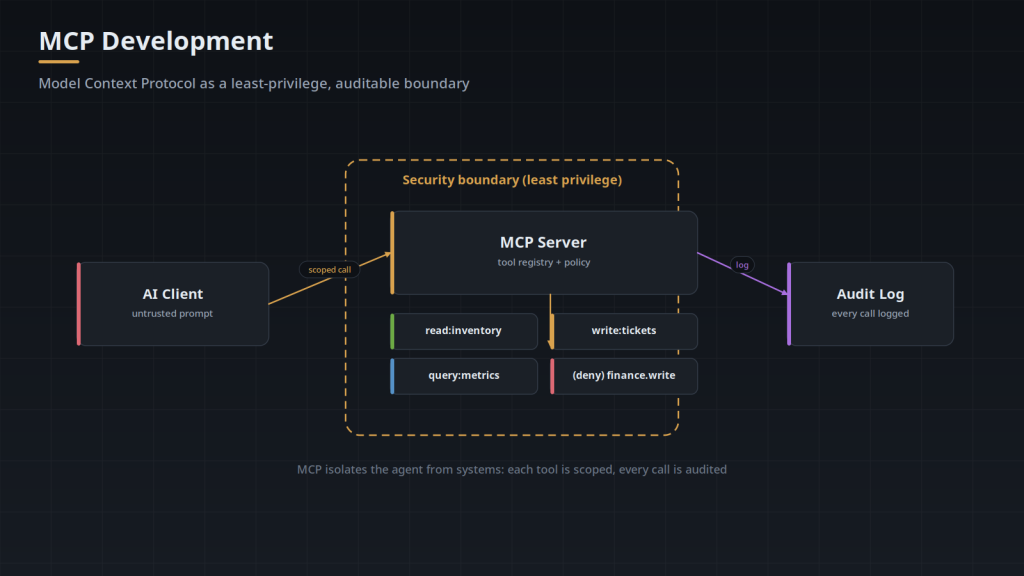
Every MCP server is scoped: least-privilege access, authenticated transport, input validation, audit logging, and approval hooks for consequential actions. We treat an MCP server as a security boundary and design it like one. For independent security review of agent infrastructure, our sister practice BulletproofSoft covers AI and MCP security assessment.
Where MCP Fits
MCP servers power Claude and Claude Code integrations, Codex repository agents, enterprise copilots, and multi-agent systems. If you are standardizing how AI reaches internal data, MCP is the layer to invest in — build it once, use it across assistants.
Describe the systems your AI should reach — we will propose the server design, security model, and rollout plan.
Related services
- AI Agent Integration Services — MCP servers exist to be integrated: AI agent integration.
- Private and On-Premise AI Deployment — Running it inside your own boundary: private and on-premise AI deployment.
What Is the Model Context Protocol?
MCP is an open protocol that standardises how AI applications connect to external tools and data. Instead of every assistant needing a bespoke integration with every system, a system exposes an MCP server once and any MCP-capable client can use it. It is the same argument that produced ODBC for databases or LSP for editors: define the interface once, and the N×M integration problem becomes N+M.
For an organization, the practical consequence is that an integration you build for one assistant is not stranded when you adopt another.
What Does an MCP Server Actually Expose?
- Tools — actions the model can invoke: query a database, create a ticket, run a report, call an internal API.
- Resources — data the model can read: documents, records, files, query results.
- Prompts — reusable templates that encode how a particular task should be approached.
The design work is deciding what belongs in each category and how granular the tools should be. Tools that are too coarse are hard for a model to use correctly; tools that are too fine force long chains of calls for a simple task. This is the part that most affects whether the result is reliable, and it is a judgement call rather than a technical one.
Should You Build an MCP Server or Use an Existing One?
Check for an existing server before commissioning one. Many common systems already have community or vendor MCP servers, and adopting a maintained one beats writing your own. Build when the system is internal, when an existing server does not expose what you need, or when you need permission and audit behaviour that a general-purpose server does not provide.
The last point is the usual reason organizations end up building. Public servers tend to assume a single trusted user; enterprise deployments need per-user scoping and an audit trail.
How Do You Secure an MCP Server?
An MCP server is a piece of infrastructure that lets a language model take actions in your systems. It deserves the same scrutiny as any other API with write access:
- Identity. Prefer acting as the requesting user, inheriting their existing permissions, over a shared service account whose broad access every user effectively inherits.
- Least privilege per tool. Scope each tool to what it needs. A read tool should not hold write credentials.
- Human approval on consequential actions. Anything that spends money, contacts a customer or deletes data should route through a person until logs justify otherwise.
- Input treated as untrusted. Content returned from a tool can carry instructions aimed at the model. Prompt injection is the defining risk of this architecture.
- Full audit logging. Which tool, which parameters, which user, what result. You will be asked.
- Idempotency. A retry must not create a second ticket or a second order.
We build these controls in from the start rather than retrofitting them. For independent review, our sister practice covers AI and MCP security.
What Does an MCP Project Involve?
Typically: agreeing which systems and which operations are in scope; designing the tool surface; implementing the server against your APIs with authentication and scoping; adding logging and approval steps; evaluating behaviour against realistic tasks before rollout; and packaging it so it can be deployed, versioned and updated like any other service.
Most of the risk is in the tool design and the permission model, not in the protocol implementation. A first project scoped to one system, read-only, with one clearly valuable workflow will teach you more than a broad rollout.
Related: AI agent integration · private and on-premise AI · AI agent development.
Transports: stdio, Streamable HTTP, and Where the Server Runs
The specification defines two standard transports, and the choice gets made early because it decides where the server process lives. With stdio, the client launches the server as a child process and the two exchange newline delimited JSON-RPC messages over stdin and stdout; individual messages cannot contain embedded newlines, and anything written to stderr is treated as log output rather than protocol traffic. With Streamable HTTP, the server is a service at a single endpoint: the client POSTs JSON-RPC messages to it and receives either a JSON response or a Server-Sent Events stream, and it can open a GET stream on that same endpoint for messages the server initiates. An earlier transport that used two separate HTTP endpoints, one for POSTs and one for SSE, is deprecated but still spoken by older clients.
A stdio server runs on the workstation, as the user who started the client, inheriting that user's environment and credentials. There is no listener to attack and no session state to manage, because the operating system account is already the permission boundary. What you give up is central control: the version in use is whatever each machine happens to have, and the audit trail is a file on that machine unless the server ships it somewhere.
A remote server runs once, somewhere you operate, and every user reaches the same process. It has to do explicitly what stdio got from the operating system: terminate TLS, validate a credential on every request, keep sessions apart, and apply rate limits. A server that listens on HTTP locally is a special case worth naming, since it should still validate the Origin header and bind to 127.0.0.1 rather than 0.0.0.0, or a page open in the user's browser can reach it through DNS rebinding. The practical differences follow from that:
- Updates. A remote server is one deployment on one version, so a fix reaches every user at once and a rollback is a single action. A stdio server is installed per workstation and changes when each user's client or package updates.
- Visibility. A remote server logs where you can query it. A stdio deployment writes its audit records on each machine, so central logging is a separate piece you have to build and keep working.
- Data locality. A stdio server can read whatever the user's machine can read, including a local checkout or a mounted share. A remote server sees only what it can reach from its own network position, which rules it out for work that depends on files that never leave the laptop.
- Credential exposure. A remote server holds its credentials in one place, where they can be rotated on a schedule. Distributing a stdio server means distributing whatever it authenticates with to every machine that runs it.
How Authorization Works on a Remote MCP Server
On a remote server the current specification puts you in the OAuth 2.1 resource server role: the server validates tokens and never issues them. It advertises where tokens come from by serving protected resource metadata at /.well-known/oauth-protected-resource, per RFC 9728, and by returning a WWW-Authenticate header on a 401 that points at that document. From there the client reads the authorization server's own metadata (RFC 8414), registers itself, often through dynamic client registration (RFC 7591), and runs an authorization code flow with PKCE, passing a resource indicator (RFC 8707) so the token it receives is minted for your server specifically.
Validation on the server side starts with an audience check: a token issued for a different resource is rejected even though it is genuine and unexpired. The specification is also explicit that the caller's token must not be forwarded to the upstream API, which raises the question of what the server presents instead. Carry the caller's identity forward: after validating the token, the server exchanges it for an upstream credential scoped to that same user, through a token exchange (RFC 8693) at your identity provider or through a per-user grant captured when that user first connected. Upstream permissions and upstream logs then reflect the individual, which is what makes per-user scoping real rather than nominal. An application identity is the fallback for upstream systems that cannot represent individual users at all, and it shifts the burden onto the server, which now has to carry the caller's identity into its own authorization checks and its own audit records because the upstream system no longer will.
These failures present as connectivity problems and are not. A client reporting that it cannot connect is often receiving a 401 with no WWW-Authenticate header, or metadata served on a host or path that does not match the URL the user typed, so discovery never starts and there is nothing in the server's application log to see. Fetch the metadata URL derived from the server URL and read the 401 headers directly before looking anywhere else; if both are correct and the flow still fails, the next suspects are a redirect URI the authorization server does not have registered and a token whose audience does not match. Tokens also expire mid-run on long agent sessions, so an expired token has to produce a 401 the client can act on rather than a 500 it cannot.
Evaluating Tool Behavior Before Rollout
The tool name, its description and its JSON Schema are the entire interface the model sees. They are prompt text, not documentation: a parameter called id with no description gets guessed at, a set of allowed values written as free text gets invented values, and two tools whose descriptions cover overlapping ground get chosen between arbitrarily. Most corrections during an evaluation pass are wording and schema changes rather than code changes, which is the argument for running that pass before the tool surface is frozen into client configurations that are painful to update.
Error text is read by the model as well, so it is part of the interface too. A failure that returns invalid request produces a retry with the same bad argument; one that names the field, the constraint and the acceptable values usually produces a corrected call. Return execution failures as tool results marked as errors, where the model can see and respond to them, and reserve protocol level errors for calls that could not be attempted at all.
The failure modes cluster, and each has its own diagnostic:
- The wrong tool is called. Two descriptions overlap, or one is written for a human reader who already knows the system. Read the client's call trace rather than the server log, because the server never saw the call that was not made.
- The right tool is called with bad arguments. The schema is under-specified: dates without a format, identifiers without an example, fields marked optional that are only optional in certain combinations. Fix it in the schema, not in prose appended to the description.
- A routine task turns into a long chain of calls. This usually means a missing lookup: with no way to search by name, the model lists and filters records just to find the identifier it needs before the real work starts.
- The run stops partway. Often context exhaustion from tools returning whole records where an identifier and three fields would do. Pagination, field selection and truncation are server-side decisions, and the defaults matter more than the options because the model takes the default.
- Every call succeeds and the answer is still wrong. The data was real but scoped differently from what a person would have opened: a default filter, the wrong tenant, a cached view that is hours old.
What the Work Depends On From You
The server can only expose what your system already exposes programmatically. Where a workflow exists only in a user interface, with no API, no documented write path and no service account that can perform it, building that interface comes first and is a separate project with its own review. Screen automation is not a substitute: it breaks on layout changes and cannot be scoped or audited one operation at a time.
- A non-production environment with working credentials, holding data realistic enough to judge behavior against. A test tenant with three tidy records hides exactly the ambiguity that causes trouble in production.
- A domain expert available during design, not only at sign-off. Someone who does the work daily can say what a field actually means in practice, which operations exist but are never used, and which requests arrive ambiguous often enough that the server should ask rather than assume.
- The upstream rate limits and quotas, including any that apply per account rather than per key. An agent produces call patterns no human client generates, and a loop that looks harmless can consume a daily quota in minutes.
- A decision on what should happen when a request is ambiguous: ask the user, apply a documented default, or refuse. Left unspecified, it becomes whatever the model does, which varies by client and by model version.
- An owner for after handoff. Upstream APIs change, credentials expire, protocol versions move; the server needs someone who notices.
Frequently Asked Questions
Is an MCP server the same thing as an API gateway or a plugin?
No. An MCP server is a process that speaks JSON-RPC 2.0 over one of the defined transports, with a fixed lifecycle: the client initializes the connection, both sides exchange capabilities and settle on a date-stamped protocol version, and only then does any work happen. It does not sit in the path of your normal application traffic the way a gateway does, and it is not loaded inside the assistant the way a plugin is; it runs as its own process on the far side of a transport. It also contains no model, which is why the same server can serve any client and why every decision about which tool to call is made outside it.
Which AI clients can use the server once it is built?
Plan against the specific clients you are targeting, because coverage of the protocol is uneven. Tools are supported almost everywhere; resources and prompts are surfaced by some clients and not others, and the server-initiated features only work when the client declares them at initialization. Those are sampling, where the server asks the client's model for a completion, elicitation, where it asks the user a question mid-call, and roots, where it learns which directories it is allowed to touch. Read the capabilities exchanged during initialize and degrade rather than assume, and treat the negotiated protocol version the same way, since a client offering an older version needs either the older behavior or a clean refusal.
What has to exist before this work can start?
A place to run the server, in a language with a maintained SDK. Implementations exist for TypeScript, Python, Java, Kotlin, C#, Go, Ruby, Rust, PHP and Swift, so this usually follows whatever your team already operates rather than introducing a new runtime. For a remote server, add a deployment target that terminates TLS and an authorization server that can issue tokens for it, which in most organizations is the identity provider already handling single sign-on. A stdio server needs neither, since it runs on the same workstation as the client.
How does the server actually get installed for the people who use it?
For a stdio server, each client reads a configuration file naming the command to run, its arguments and its environment variables, and launches the process at startup, so a configuration change takes effect when the client restarts. Organizations normally push that file through existing device management instead of asking users to edit JSON by hand. For a remote server, the user adds a URL in the client's connector settings and signs in through the authorization flow, so onboarding happens per user and access is revoked at the identity provider rather than on the device.
Should one server cover several systems, or do we build one per system?
Draw the boundary around the credential and the owner rather than around tidiness. One server per upstream system keeps credentials, rate limits, release cycles and outages separate, so a bad token or a bad deploy affects one integration instead of all of them. A combined server earns its place when clients cap how many connections they will hold, or when a workflow needs a join across systems that neither side can perform alone. Either way the model sees one merged list of tools from every connected server, so names have to be unambiguous across servers, not merely within one.
What can the server itself do about prompt injection?
Enforce the limits it can check without a model in the loop. By the time an injected instruction becomes a tool call, that call is well formed and arrives from an authenticated user, so the server cannot separate intent from content. What it can do is bound what any single call or session accomplishes using checks that do not depend on the model's reasoning: a recipient allowlist, a maximum amount, a cap on rows returned or changed, a limit on writes per session, and a confirmation value that only a person can supply for destructive operations. Content arriving from third parties, such as ticket comments or scraped pages, is the highest risk source and is often worth serving from a separate read-only server so that write tools are not one call away from it.
When is an MCP server not the right answer?
When only one client will ever use the integration and the interaction is not open-ended. A scheduled job or a direct API call is less software to operate than a protocol server, and a workflow whose steps never vary gains nothing from a model choosing the next one. The case for MCP is several clients, or one client plus a realistic expectation of others, together with permission and audit behavior that has to be identical no matter which assistant is asking. If you cannot name a second consumer and the task is fully deterministic, write the script instead.
Recorded Demonstrations
A worked example of an MCP server driving a real system: a Niagara N4 building-automation station operated end to end through natural language. Building automation itself is the work of our sister practice SoftwarePile; what is being shown here is the MCP layer.
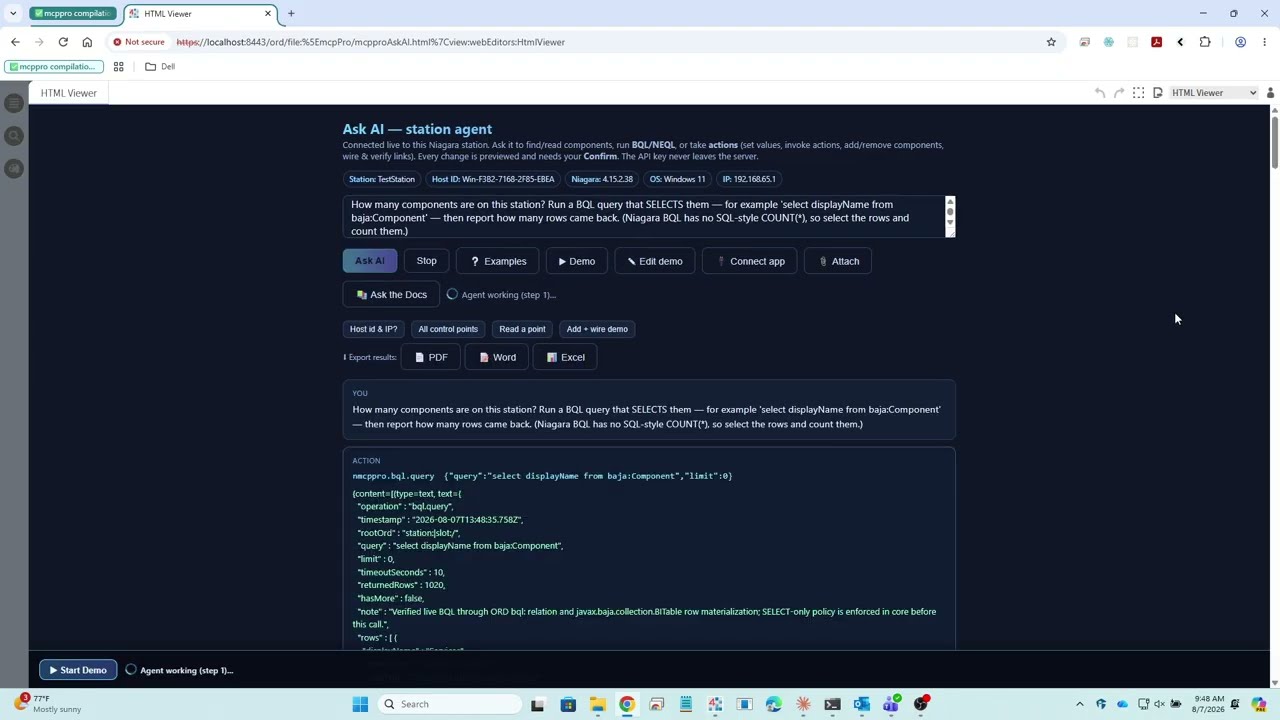
A Worked Example: MCP Against a Live Industrial System
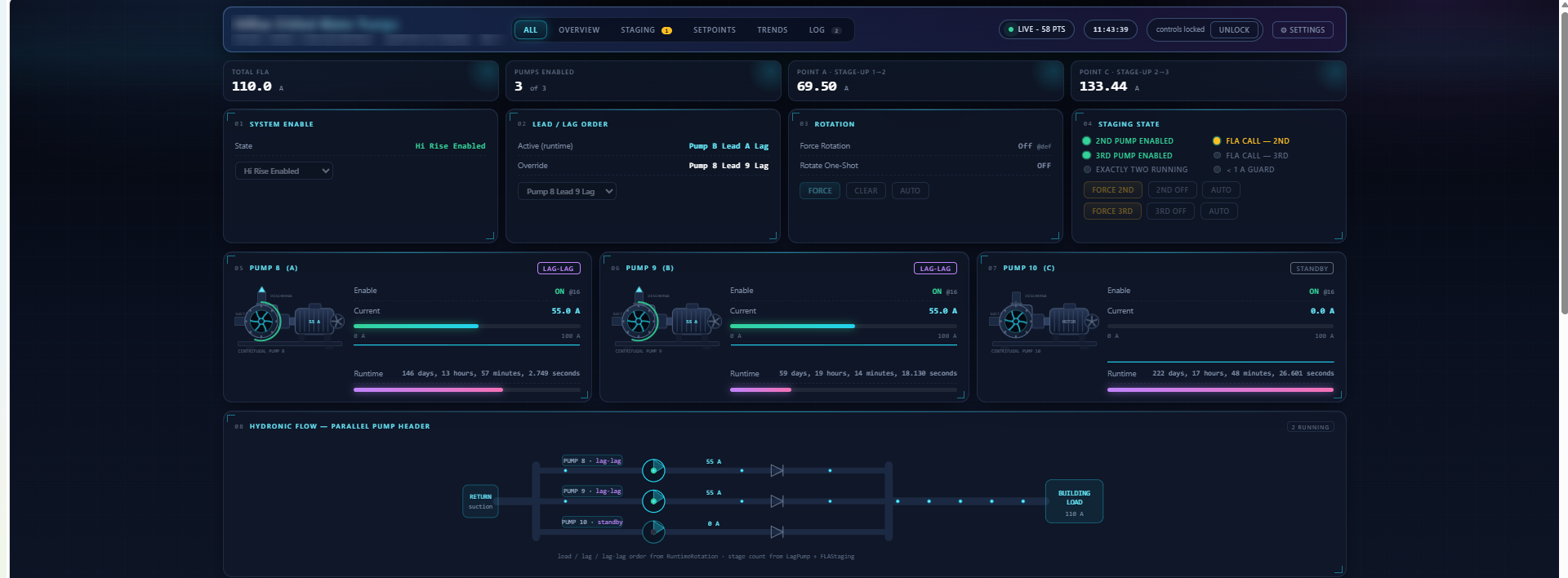
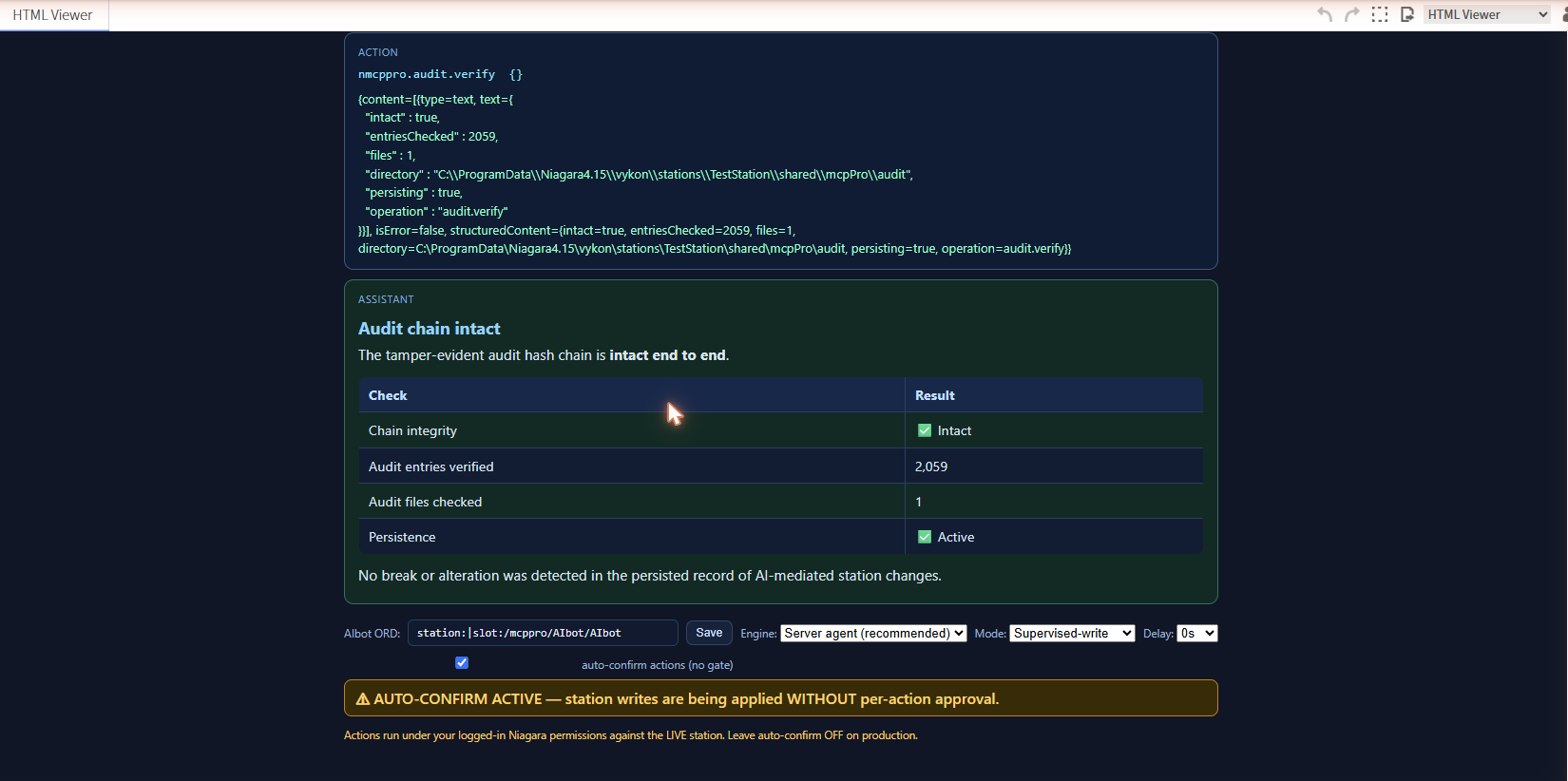
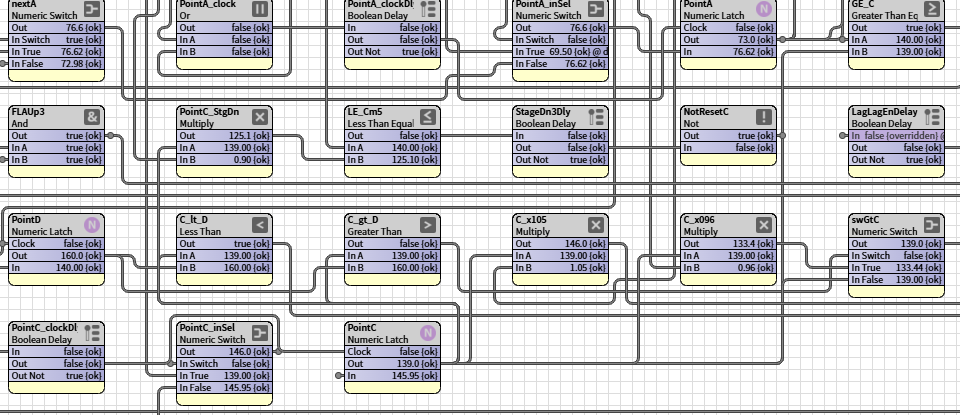
The screenshots below come from an in-station MCP server built for the Niagara Framework. It is the same architecture this page describes, applied where the consequences are physical: the tools create and wire real control logic on a running station.
The safety model is the part worth studying. Every write is gated and bound to a real platform user, and the audit record is a tamper-evident hash chain that can be re-verified on demand rather than a log file anyone can edit. Building automation itself is the work of our sister practice SoftwarePile; what is shown here is the MCP layer.