
Once a business decides it wants an AI agent, the next question is usually build-it-with-Microsoft or build-it-custom. Microsoft Copilot Studio and a custom-built agent can both get you there, but they suit different situations. Here is how to tell which one fits — without the marketing on either side.
The Case for Copilot Studio
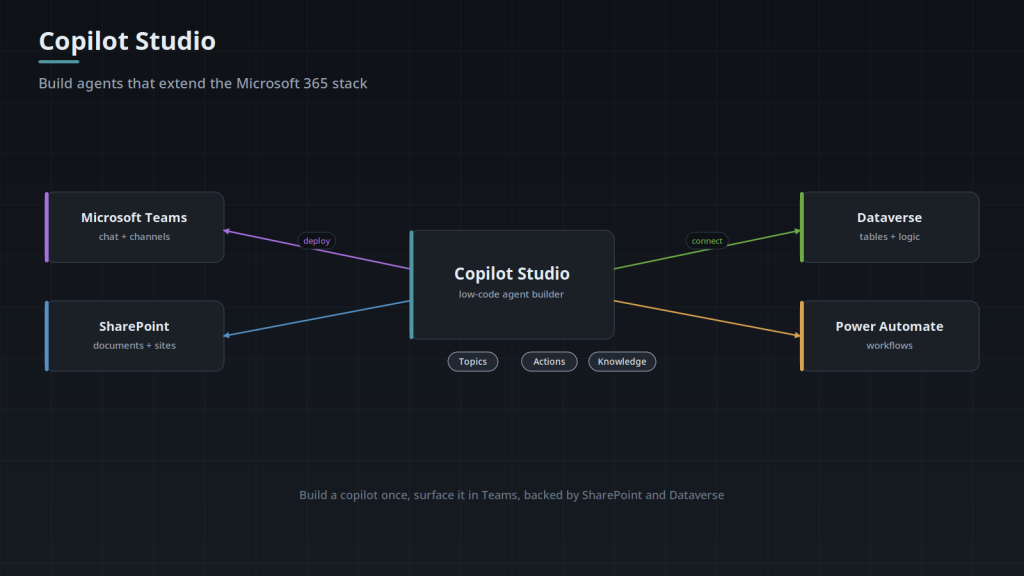
If your organization already runs on Microsoft 365 — your identity is Entra ID, your documents live in SharePoint, your people work in Teams — Copilot Studio lets an agent inherit all of that instead of rebuilding it. Sign-in, permissions, content, and delivery come from the ecosystem you already pay for and govern. For a knowledge assistant grounded in SharePoint, or an agent that acts through Power Automate, that is a real head start on both time and governance.
You trade some flexibility for that speed. You work within the platform’s connectors, its extensibility model, and its way of doing things. For a large set of internal business agents, that trade is exactly right.
The Case for a Custom Agent
A custom agent is the answer when the platform’s edges get in your way: you need a specific model, a specialized retrieval pipeline, deep integration with non-Microsoft systems, unusual orchestration across multiple agents, or deployment somewhere the data cannot leave. Custom means you own the architecture end to end — and carry the responsibility for the identity, security, and governance that Copilot Studio would have provided.
Custom is more work up front. It is also the only path when your requirements genuinely exceed what a platform will do.
A Simple Way to Decide
Ask three questions:
- Where does your data and identity live? Deep in Microsoft 365 points toward Copilot Studio. Spread across other systems, or outside the cloud entirely, points toward custom.
- How unusual are your requirements? Standard knowledge and workflow agents fit the platform. Specialized models, pipelines, or multi-agent orchestration push toward custom.
- What are your deployment constraints? If data cannot leave your environment, or you need a specific model or region, custom is often the only option.
It is not always either/or. A common pattern is Copilot Studio for the broad internal agents and a custom agent for the one hard workflow that justifies it — connected through the same MCP layer so they reach your systems consistently.
The Honest Answer
Most vendors recommend whichever they sell. We build both, so our advice is not pre-decided. In practice: if you are a Microsoft shop with a standard internal use case, start with Copilot Studio — it is faster and the governance is easier. If your requirements are unusual or your data will not sit neatly in the Microsoft world, custom will serve you better even though it costs more up front.
Tell us your environment and use case and we will give you the honest recommendation — including which platform, and why.
Five Layers, and Which Ones Survive a Switch
It helps to stop treating the agent as one product. There are five layers: identity and permissions, knowledge and retrieval, the agent definition itself (instructions, topics, orchestration logic), tools and integrations, and the surface it is delivered on. The layers do not port equally.
This is the argument for putting your systems behind MCP servers rather than platform-native connectors, and it is worth stating precisely. It makes the integration layer reusable in either direction, because the same server can back a Copilot Studio agent and a custom one. It does not make the decision reversible. The agent definition, the identity work, and the operational history stay where they were built.
- Ports cleanly: the document corpus, your evaluation set, prompt and instruction text, and tool contracts if they are defined outside the platform. An OpenAPI spec or an MCP server is a contract, not a platform artifact.
- Does not port: topics and their trigger phrases, Power Automate flows, custom connector definitions, conversation state held in Dataverse, and the analytics history sitting in the platform's own tables.
- Ports in one direction only: the identity layer. Entra ID sign-in, the OAuth 2.0 on-behalf-of exchange that lets the agent call downstream APIs as the signed-in user, and retrieval that filters on that user's access at query time are things a custom agent has to build. That effort goes one way; moving onto the platform later does not hand any of it back.
Where the Obvious Answer Is Wrong
The three questions above sort most cases correctly. These are the ones they sort wrong. None of them are edge cases. In the first two the question is aimed at the wrong variable; in the rest the stated requirement is standing in for something narrower that both options can meet.
- An audience with no accounts in your tenant. Everything the platform inherits is keyed to an Entra identity: single sign-on, the user token passed to connectors, permission-trimmed retrieval. Serving anonymous external users means none of that applies, and you are configuring an identity-shaped platform for a case with no identities in it. The internal-versus-external split can decide more than the Microsoft-versus-not one, which is why the guidance above is scoped to internal use cases.
- "Data and identity" is one question here and two questions in practice. Where the documents and the user accounts live is what decides it. Where the CRM or the ERP lives usually does not, because both options reach a line-of-business system the same way, over its API. A company running Salesforce and NetSuite that still keeps every document in SharePoint and every account in Entra is closer to a platform case than its vendor list suggests.
- "The answers are not good enough." Model choice is rarely the cause. Check whether the correct source document was retrieved at all before blaming the model; if it was never retrieved, no model swap fixes it, and the real fixes (source scoping, chunk size, metadata filters) are available on both options. A genuine model requirement is specific: version pinning, a particular region, self-hosting, or a tuned model.
- "We need multi-agent orchestration." Usually the requirement is one agent that can call several tools, which both options do. Separate agents earn their keep when they have different permission scopes, different owners, or different release cadences, not when the work simply has several steps.
- "Our data cannot leave our environment." Pin down what environment means before this decides anything. If it means a sovereign region, an air-gapped network, or a model that never receives the text, that is a real custom constraint. If it means "not a third-party service we have not reviewed," your Microsoft 365 tenant may already satisfy it, which makes it a governance question for your own admins rather than an architecture one.
The Second Axis: What Each Option Costs You After Launch
Custom is more work up front, as this page says. The up-front comparison hides a second axis, though: the two options hand you different kinds of standing work, and the standing work does not end at launch.
- Custom: retrieval and permission freshness are permanent jobs. An index built over a document store is a copy, and copies drift. Documents move, a group membership is revoked, a site is re-permissioned, and the index keeps answering from the version it has. Someone owns reindexing and permission sync with no end date. Model deprecation is the second standing job: providers retire versions, and instructions tuned against one version are not guaranteed to behave the same on its replacement, which is why the evaluation set has to be a live asset rather than a launch artifact.
- Platform: the standing work is governance you administer and change you do not control. Microsoft ships changes to the orchestration and authoring surface on its own schedule, so behavior can move without you touching anything. That is the flip side of not maintaining it yourself. Connector throttling limits and tenant DLP policy also sit outside your project, so a working agent can stop working because an admin tightened a policy you did not know applied to it.
- Hiring: the choice quietly writes a job description. A Copilot Studio agent can be maintained by someone with Power Platform skills. A custom agent needs someone who can read a retrieval trace, reason about token budgets and rate limits, rotate secrets, and debug an OAuth flow. Both are hireable. They are not the same hire, and the second is harder to replace from inside the business.
- Who is allowed to change it. If the people who need to adjust the agent's behavior are not developers and need to do it weekly, the authoring surface is the product you are actually buying. If changes should go through review, tests, and CI, the platform's lifecycle model (export a solution, import it into the next environment) works against that: topic and orchestration changes do not produce a diff anyone can read line by line.
- The metering shapes differ. Platform consumption is billed per interaction, so it tracks adoption. A self-hosted stack carries its search and compute footprint whether or not anyone used the agent that month, with token spend on top. Model that against your expected usage curve rather than assuming the two shapes are interchangeable.
- Lock-in is mostly not the model. The model is the most swappable component in either design. What holds you is the set of flows and connectors written against one platform's contract, the conversation history sitting in its store, and the permission model built around it.
Failure Modes, by Option
Each option fails in a characteristic way, and knowing the shape in advance is most of the mitigation.
- Copilot Studio, over-sharing amplified. The platform enforces the permissions that exist, which is exactly the problem: content on a site that was over-shared years ago was always technically readable and practically buried. An agent makes it findable in one sentence. Search changes the blast radius of a permission mistake without changing the permission.
- Copilot Studio, grounding scoped too wide. Pointed at a whole tenant, the agent will answer confidently out of a superseded draft nobody deleted. Narrow the sources first and widen deliberately; a small curated corpus beats a large one on every measure a user notices.
- Copilot Studio, topic collision. As topics accumulate, two of them compete for the same utterance and routing gets unpredictable, so phrasings that used to work stop working. The fixes, consolidating topics or moving routing to generative orchestration, change behavior for the utterances that were fine, which makes this easier to prevent than to unwind.
- Custom, the agent with more authority than its user. A service principal holding broad API rights is much easier to build than the on-behalf-of flow, and it works in testing. It becomes a privilege escalation path the first time a user asks the agent for something they could not open themselves. This is the most common shortcut in a custom build and the hardest one to retrofit.
- Custom, injection through retrieved content. Any agent that ingests web pages, email, or user-supplied documents will eventually retrieve text written to instruct it. The mitigation is architectural rather than a prompt: keep tool authority separate from retrieved content, scope every tool call to the calling user's permissions, and never let retrieved text authorize a write.
- Custom, silent failure. A wrong answer does not throw an exception, so nothing pages anyone. Without answer logging, a sampled review, and a named owner, quality degrades for months before anyone reports it, and the report arrives as a loss of trust rather than as a bug.
Testing the Decision Before You Commit to It
A pilot can answer this before either full build, but only if it is scoped to answer the question rather than to produce a demo. The unit that settles it is the same use case built twice at low fidelity, against one question set.
Build the question set first, from the people who will actually use the agent, and record for each question both the correct answer and the source document it should come from. A set assembled after the pilot describes the pilot.
Write the decision rule before you run it, or the result gets interpreted to match whichever answer the room already preferred. A rule is falsifiable: if retrieval recall stays below an agreed threshold on the evaluation set after two rounds of source scoping, that is a finding. "See how it goes" is not a rule.
- Instrument retrieval separately from generation. For each question, log the identifiers of the sources actually returned and score them against the expected source before anyone grades the wording of the answer. Report two numbers, not one.
- Run under a real user's identity, never the builder's. Builders usually hold broader access than their audience, so a pilot run as the builder answers questions the shipped agent will not be able to answer.
- Include questions the agent should refuse: out of scope, and no answer exists in the corpus. An agent that answers everything has not been tested, and confident invention is far harder to detect after launch than a visible refusal.
- Rehearse the maintenance. Have the person who will own the agent after launch make a real change during the pilot, such as adding a source or correcting a wrong answer, without the build team touching it. That one exercise settles the "who is allowed to change it" question above better than any estimate.
- Keep the fidelity low on purpose. A pilot that grows a polished interface, a change process, and an integration backlog has stopped being a test and become the project you had not yet decided to do.
Frequently Asked Questions
Can one backend serve both a Copilot Studio agent and a custom agent?
Yes, and that is the usual reason to expose your systems through MCP servers or a plain OpenAPI service instead of platform-native connectors. MCP is JSON-RPC 2.0 carried over stdio or streamable HTTP, and the client discovers the available tools and their input schemas at runtime, so the same server can be listed by either client without being rewritten. The part that gets missed is authorization. Two different clients present identity in two different ways, so the server has to enforce the end user's permissions itself rather than trusting whoever called it. A tool that returns whatever it is asked for is a permission bypass with a schema attached.
If we start on Copilot Studio and later outgrow it, how big is the switch?
Rebuilding the agent definition is usually the smaller half of the work. The larger half is the identity layer, because whatever you rebuild still has to authenticate the user and enforce per-document access at query time, and that is a system to run rather than a setting to configure.
How do we tell whether we have outgrown the platform or just configured it badly?
Try to name the boundary in one sentence a support engineer could act on. Real boundaries are concrete: a model or region the platform does not offer, an audience it cannot authenticate, a per-turn latency budget its orchestration cannot meet, a write that must be ordered and idempotent under the agent's control. Dissatisfaction is not a boundary. If the sentence comes out as "the agent is not smart enough," you have a configuration problem wearing a platform-shaped explanation, and going custom carries it across intact.
Retrieval is returning the right source and the answers are still wrong. What do we change?
In this order: instructions, then tool design, then the model. Instructions first, because most of these cases are an agent that was never told what to do with the source it found, such as quote it, cite it, prefer the newest version, or decline when the source does not support an answer. Tool design second, because models are routinely asked to do arithmetic, lookups, and date math that belong in a deterministic tool; hand the exact work to a tool and grade what comes back. Model last, and by then the change worth testing is a named capability such as longer context handling or reliable structured output, not a better model in general.
If we run both, where should the boundary between them go?
Draw it at the data and permission boundary, not the feature boundary. Route by which system of record the answer comes from and which permission model governs it, so no question can be answered correctly by one agent and differently by the other. Give users a single entry point and let a router hand off, rather than asking them to pick the right agent, since nobody outside the build team knows which backend owns their question. Keep one evaluation set spanning both, so a routing mistake surfaces as a wrong answer in the numbers instead of a silent gap nobody measures.
What should a pilot prove besides answer quality?
Three things the quality scores miss. Latency in the slow tail rather than the average, measured with the retrieval call, the permission check, and any tool call in the loop, because a turn that is fine on its own can blow a conversational budget once those sit in front of it. Whether anyone comes back in week two, since novelty carries week one and an agent nobody reopens has failed regardless of its scores. And whether people ask a second question in the same conversation, because follow-ups like "and what about last year" depend on carried context and reused retrieval, which single-turn demos never exercise and which is where agents most often come apart in front of a real user.