

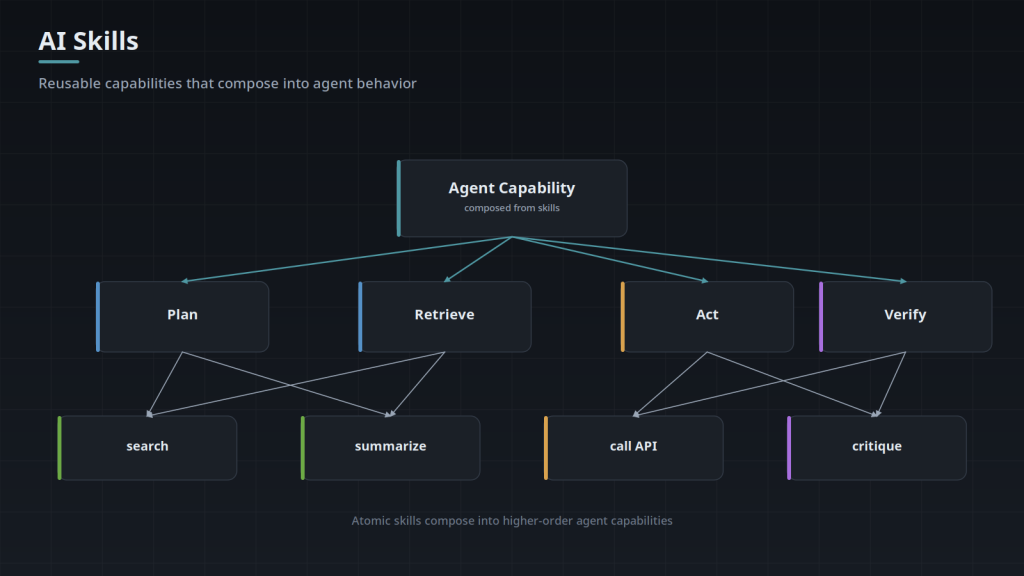
AI agent skills, project instructions, and Skills.md development turn a capable-but-forgetful AI into one that reliably repeats your best work. A skill packages a proven workflow — the steps, the checks, the references, the tools — so the agent does the job the right way every time, not just when someone remembers to explain it.
What an Agent Skill Contains
A skill is more than a prompt. It can include the procedure to follow, checklists, reference material, validation steps, and instructions for which tools to use and when. Where a prompt is a one-off request, a skill is a durable, versioned capability the agent loads when the task calls for it — the difference between telling someone what to do once and giving them a written standard operating procedure.
What We Build
- Skills that capture your successful workflows so they are repeatable across the team
- Project instructions that give repository agents persistent knowledge of your codebase and conventions
- Skills that bundle scripts, checklists, references, validation procedures, and tool instructions
- Version control and testing for skills, so a change is reviewed like any other code
- A maintenance approach so skills stay correct as your systems evolve
Why It Matters
The value of an AI agent compounds when its successful patterns are captured instead of rediscovered. Skills are how you stop re-explaining the same procedure, how you keep quality consistent across people and projects, and how institutional knowledge survives turnover. Done well, they are one of the highest-leverage investments in an agent program.
Tell us the workflows worth capturing — the procedures your team repeats and wants done consistently. We will build them into tested, versioned agent skills.
Related services
- AI Workflow Automation — Skills in the context of a whole workflow: AI workflow automation.
Do You Need a Skill, or Will a Prompt Do?
A prompt is fine when the task is a one-off and the person reading the output is the person who asked for it. A skill is worth writing when the same procedure runs again and again, when different people get different results from the same request, or when the checks around the work matter as much as the work itself.
There is a filter to apply before any of this. If you cannot write the procedure down clearly enough for a new hire to follow, an agent will not rescue it. Writing it down is not wasted effort even if you stop there, because it is where a team finds out whether the steps everyone assumed were shared were ever actually agreed.
Skills, Project Instructions, and MCP Servers Do Different Jobs
Project instructions are ambient context the agent carries all the time: conventions, architecture, what to leave alone. A skill is a procedure loaded when a specific task calls for it, which keeps the agent’s attention on the steps that matter for that job. An MCP server is the connection itself, the thing that lets an agent read or change a real system.
Treating the three as interchangeable puts all the weight in one place. If every procedure ends up in project instructions, that file grows until nobody can say what the agent is attending to on any given task. Our Model Context Protocol material covers the connection side in more depth.
Where Skills Break
The name and the trigger description decide whether the right skill loads at all. That failure hides easily, because a skill that never loads produces no error, only an ordinary answer.
- Drift: the skill names a script path, a table, or a report that has since moved or been renamed, and the agent improvises around the gap.
- Aspiration: the skill documents the process someone wishes were followed, the real process differs, and output fails review for reasons nobody wrote down.
- Overlap: two skills describe similar work and the wrong one loads because both trigger descriptions are vague.
- Length: a skill written to cover every branch gets long, and a long procedure is harder to follow to the end. Splitting at the decision points keeps each path readable.
Prompt Injection When a Skill Can Act
A skill that reads tickets, inboxes, PDFs, or web pages is reading text an outsider can author, and it will be phrased to look like a legitimate instruction from a colleague.
The skill-specific point is that the procedure is itself a control surface. Write the permissions into the skill: if the procedure only reads, the skill should not hold a credential that can write. Where a step is consequential or irreversible, put the approval into the written procedure so it survives the next edit by someone who was not in the design conversation. The architectural defenses sit on our Technologies page. Treat a passing test as evidence and keep the approval gate anyway.
Testing a Skill Before It Goes Wide
Run the skill against work your team has already done and already agreed was correct, then read the divergences one by one instead of scoring them. Add the awkward inputs next: missing fields, two sources that contradict each other, and text written specifically to redirect it. Keep those cases in version control next to the skill, so whoever edits the trigger description six months from now finds out immediately what they broke.
A small set you trust beats a large generated one, because you can read a small set and argue about the cases that look wrong.
Who Owns It After Launch
Skills rot quietly. When an underlying system changes, the agent keeps producing confident output built on a stale procedure, and nobody notices until a reviewer catches something downstream. Give each skill a named owner, review it when the systems it touches change, and retire the ones nobody runs.
Retirement matters as much as review. A skill library that only ever grows becomes a place where two procedures describe the same job differently, which is the Overlap failure above arriving by a slower route.
How a Skill Is Packaged on Disk
On disk, a skill is a Markdown file with a YAML frontmatter block at the top. The frontmatter carries the identifying fields, typically a name and a description; everything below it is the procedure in ordinary prose. Scripts, templates, and reference documents sit beside it in the same directory and are called by relative path, which is what makes a skill a folder you can move rather than a file with dependencies scattered around the repository.
Loading is selective, and that is a context budget decision rather than a stylistic one. What is resident at the start of a session is the short identifying text, not the body; the body is pulled in when the task appears to match. A library of thirty skills whose bodies were all permanently present would spend the context window on procedures that have nothing to do with the task in front of it.
So write the description for the router. It should name the conditions that should trigger it, in the words someone would actually use when the situation arises. "Helps with documents" gives the matcher nothing to work with. "Extracts line items from vendor invoices in PDF form and checks them against the purchase order" names the artifact, the format, and the check, and those are the words that will appear in the request.
- Keep the body short and push long reference material into separate files the procedure points to, so the detail arrives at the step that needs it rather than at the top.
- Reference scripts and files by path relative to the skill's own directory, so the folder can be moved or renamed in one operation.
- Frontmatter is parsed as YAML, so a colon inside an unquoted description value, or a tab character used for indentation, is a parse failure rather than a soft warning.
- Write steps as imperatives with one action each. A sentence joining two actions with "and" is where a step gets half done.
Push the Fragile Steps into Code
Any step with exactly one correct answer should be a script the skill calls, not a sentence the agent interprets. Date arithmetic across month boundaries, currency rounding, ID and checksum formats, sort orders, schema validation, and anything with a lookup table behind it.
The dividing line is judgment against determinism. A model reading "round half up to two decimals" will usually do it correctly, and "usually" is the problem for a step that runs a few hundred times. Prose also cannot be tested on its own. A script has unit tests and can be run against the awkward inputs directly, without invoking the agent at all.
The failure signatures differ as well. A script that breaks raises an error with a line number and stops. A prose instruction the model reads differently on one run produces a well-formed answer that is wrong in a way nothing flags.
- Have the script validate its own output shape and exit non-zero when the shape is wrong, so the next step cannot proceed on a bad value.
- Put retry and pagination logic inside the script. A procedure telling the agent to keep fetching until it is done is a loop with no bound.
- Keep the script interface small: named arguments in, structured text out. The agent has to construct the call from prose, and every optional flag is another chance to construct it wrong.
- Leave the judgment in the procedure. Which exception is worth escalating, which of two conflicting sources to trust, when output is not good enough to send: those do not reduce to encodable rules, and pretending otherwise produces a script full of thresholds nobody can defend.
What the Build Needs From You
The filter earlier on this page comes first: if the procedure cannot be written down clearly enough for a new hire, it will not survive being turned into a skill, and the writing is worth doing on its own terms. What a handed-over document does not contain is the part its author does not know they are doing: the check they run without thinking, the input they discard on sight, the case where they quietly go ask someone. The document is the input, and one session watching the procedure run is what fills in around it. That session is the one part of this work that cannot be done asynchronously.
Access is the other dependency, and read-only is enough for most of the build. A procedure can be written, run against past work, and argued about before the skill ever holds a credential that can change anything. Where the systems hold regulated or customer data, a copied subset with the same shape usually makes a better test bed than the live one, because the awkward inputs can be constructed instead of waited for.
- Completed outputs from past runs, plus the reason each one passed review. The reason is what the test cases actually compare against; the output alone only tells you the shape.
- Who is allowed to approve the steps the procedure stops on, stated by role, because the skill has to name it rather than say "get sign-off".
- What the procedure should do when two inputs disagree: a precedence order, or a stop. Left unstated, the agent will pick one and the pick will not be recorded.
- Who owns the skill afterward, decided while the procedure is being written rather than at handover, since the owner is usually the person whose corrections shape it.
What the Procedure Does When a Step Cannot Run
Most written procedures describe the path where everything is present. An agent will follow that path even when the preconditions are not met, because an incomplete input still permits a plausible answer. The procedure has to say, inside the step itself, what missing looks like and what to do about it: stop and report which precondition failed, or continue with a named default.
The distinction worth writing down is between a step that can be skipped and a step that invalidates everything after it. Skipping an optional enrichment lookup changes how complete the output is. Skipping the check that the source data covers the period being reported changes whether the output means anything, and there the procedure should refuse rather than continue. If that difference is not in the file, the agent decides it for you, differently on different runs.
Partial results need a label, and the label has to be in the output rather than in someone's memory of the run. Say which fields are populated, which are marked unknown, and that unknown is written out explicitly, because a blank field reads as a value that happened to be empty.
- Put the precondition in the step, not in a preamble. A list of checks at the top of a long procedure gets read once and applied loosely.
- Distinguish "not found" from "not checked" in the output. They lead to different next actions and both otherwise look like an absent value.
- Give stop conditions a fixed phrase that can be searched for, so incomplete runs can be found later without reading each one.
- Where a step calls an external system, say what happens on a timeout as distinct from an error. A timeout may mean the other side already did the work, which makes a blind retry the wrong default.
Steps That Were Workarounds for an Older Model
Procedures accumulate lines written to route around a limitation that no longer exists. Chunk the input into small pieces. Restate the question before answering. Do not attempt the table, produce a list instead. They quietly cost context, constrain the output shape, and go on being followed precisely because the skill is doing its job.
They persist because the file records the instruction and not the reason for it. Six months later the constraint reads as deliberate, and the reasoning cannot be reconstructed afterward by someone reading the file cold, so nobody removes it. Write the reason beside the constraint when you add it, in one clause, including what you saw that made you add it.
When the underlying model changes, those annotations become a work list. Take the constraints one at a time, remove the workaround, run the stored test cases, and keep the removal only where every test still passes.
- Date the constraint, or name the model version it was written against. Without that, the annotation is an opinion of unknown age.
- Formatting scaffolding is the usual survivor: the schema restated before every item, examples repeated for each field, explicit instructions to emit valid JSON.
- Instructions that ban a tool are worth rechecking early, because a banned tool is usually replaced by a longer manual procedure somewhere else in the same file.
- A workaround removed in one skill is usually present in several. Search the library for the phrase before assuming it was local to the file you are editing.
Frequently Asked Questions
How is a skill different from the README or runbook we already have?
A README describes what a system is and leaves the reader to decide what to do with it. A skill states what to do, in order, with the checks attached and the outputs named. Runbooks are closer, but they are written for a colleague who already knows which account to use, which environment they are in, and what a finished result looks like, and a skill has to say all three. Converting an existing runbook is usually where the missing steps surface.
Where do skills live, and how does installation work?
Two shapes are common. A skill can live in a directory committed to the repository the agent already works in, so it travels with the code it describes and branches with it; or it can be installed at the workspace or account level, where it is available across every project that team touches. Repository placement is the right default when the procedure only makes sense against that codebase. Installing is closer to a file sync than to a software install: the files land in the directory the runtime scans, there is no build step and no service to run.
Do we need MCP servers before we can use skills?
Not for every skill. A skill that only reads and edits files in the repository the agent already has open needs no connector at all. Where a connector is involved, one server can serve several skills, so that work is not repeated for each procedure you write. It also means the same skill can run against a test instance and a live one by pointing the connector at a different endpoint, with the procedure unchanged.
Does the same skill work across different agent tools?
The body ports, the packaging does not. The procedure itself is Markdown prose and moves between runtimes unchanged. Frontmatter field names, the directory the runtime scans, and how a skill is invoked differ by product, and any step naming a specific tool or connector has to be re-pointed. Plan a port as a packaging change plus a pass over the tool-calling steps, not as a rewrite.
How do we tell whether a skill is actually being used?
Check the run logs rather than the output. Most runtimes record which skills loaded for a given session, and that record answers the question directly. Where those logs are not available, have the skill emit an identifiable marker in what it produces, such as a version string in a footer or a distinctive field name in the structured result, then search recent work for it. If the marker is missing from runs that should have triggered it, the trigger description is the first thing to look at.
Can we just write our own?
Yes, and many teams should. Outside help earns its place in three situations: the procedure spans systems that no single person on your team operates; the skill will act rather than only draft, so the permission and approval design matters as much as the steps; or earlier attempts load inconsistently and nobody has isolated whether the cause is the trigger description or an overlap with another skill. A review of a skill your team wrote is a reasonable place to start.