
Engineering and CAD AI agents act on real geometry. Not a chatbot that describes a bracket — an agent that creates the parametric model, mates the assembly, generates the drawing, runs the check, and leaves a versioned trail of everything it did. Software Depo builds Model Context Protocol servers that expose SolidWorks and AutoCAD to AI agents through a governed, audited tool layer.
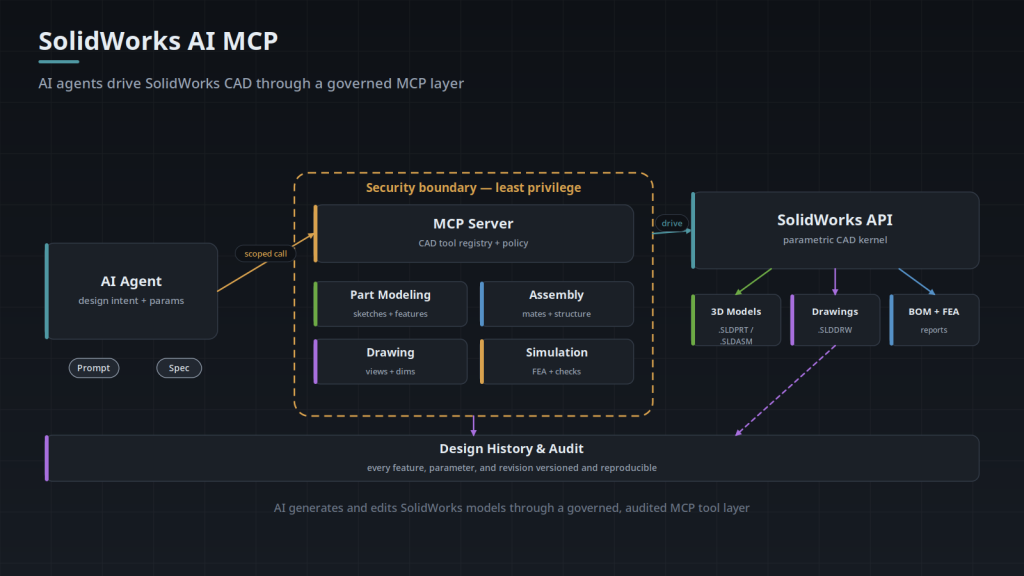
CAD actions are consequential and often hard to reverse, so the architecture is deliberate: the MCP server sits as a security boundary between the untrusted AI client and the CAD kernel. Every tool is individually scoped to least privilege, every call is recorded, and every change lands in a reproducible design history.
Both systems described below are built and working. The capabilities on this page are implemented, not planned — we are happy to walk an engineering team through either one and show the tool surface, the policy layer, and the audit trail in operation.
SolidWorks AI MCP
Exposes SolidWorks part modeling, assembly, drawing, and simulation to an AI agent through scoped MCP tools. The agent holds design intent — a prompt and a spec — and invokes only the CAD operations policy allows.
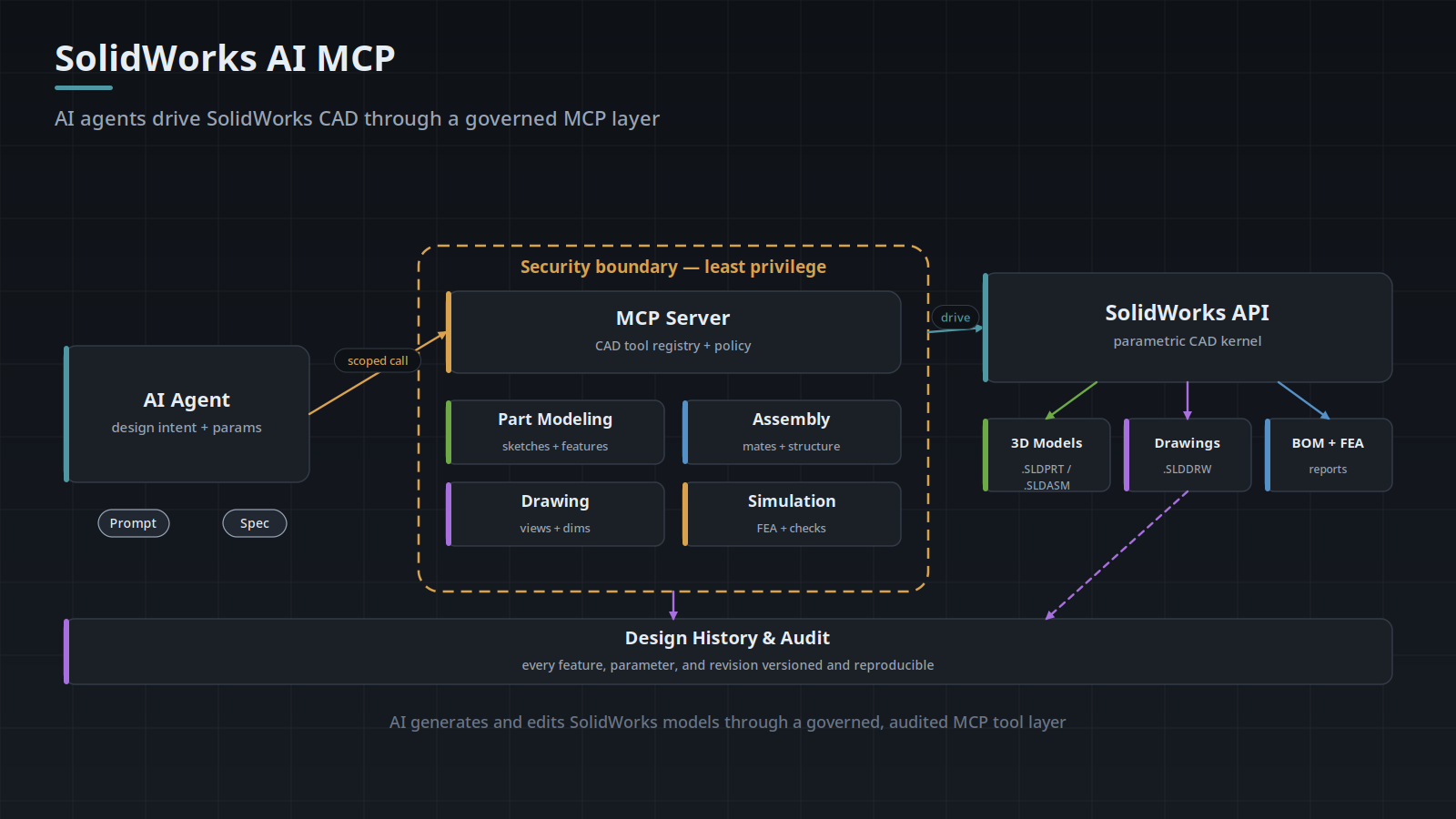
- Part modeling — sketches, extrudes, revolves, and feature edits against live
.SLDPRTgeometry. - Assembly — insert components, apply mates, manage structure in
.SLDASM. - Drawing — generate 2D views, dimensions, and annotations into
.SLDDRW. - Simulation — run FEA and design checks, returning pass/fail results and reports.
- Design history and audit — every feature, parameter, and revision versioned, traceable, and reversible.
This turns generative design into something usable: “design a bracket for a 200 N load, minimise mass” produces an editable parametric model rather than a paragraph. Natural-language edits — add a 5 mm fillet to all external edges, switch this to aluminium — execute against the live model, and simulation-in-the-loop lets the agent propose, test, and iterate with every step logged.
AutoCAD AI MCP
Drives AutoCAD from natural language instead of manual commands or one-off scripts, producing real DWG and DXF drawings. The tool surface is grouped into six individually permissioned clusters, and the server supports batch execution with dependency graphs so a multi-step drawing operation runs as one coherent unit.
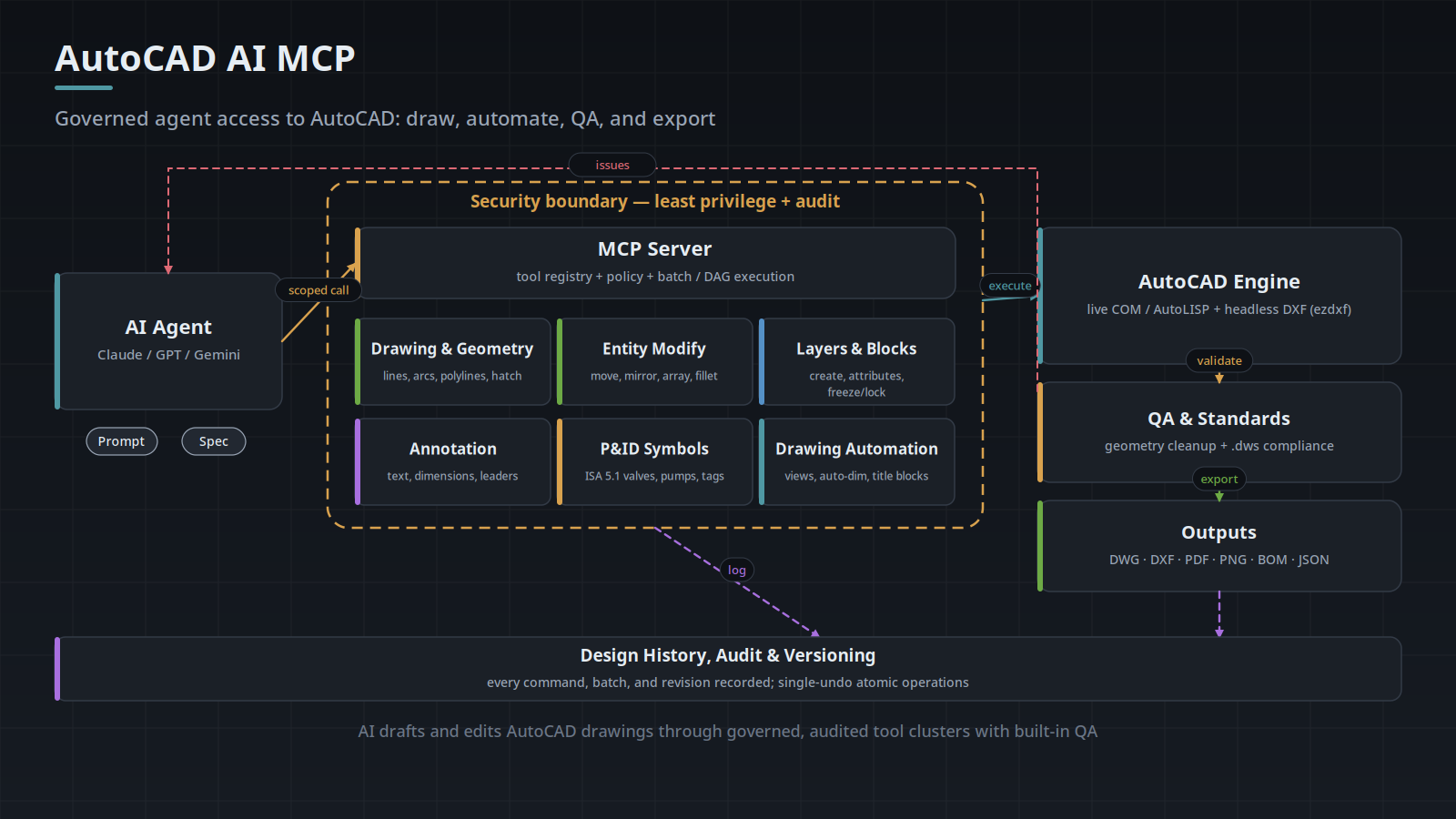
- Drawing & geometry — lines, arcs, circles, polylines, rectangles, ellipses, hatches.
- Entity modify — move, copy, rotate, scale, mirror, offset, array, fillet, chamfer, erase.
- Layers & blocks — create and modify layers, freeze/thaw, lock, block insert and attribute management.
- Annotation — text, mtext, linear/aligned/angular/radius dimensions, leaders.
- P&ID symbols — ISA 5.1 symbol library, pumps, valves, tanks, instruments, process lines, flow arrows, equipment tags.
- Drawing automation — orthographic, section and detail views, intelligent dimensioning, title blocks, sheet layouts.
Dual backend and a QA gate
Operations execute either through live AutoCAD (COM / AutoLISP) for interactive sessions, or a headless DXF backend for server-side generation without a GUI. Before anything is exported, drawings pass a QA stage: geometry cleanup detects gaps, overshoots, undershoots, and misaligned angles, and a .dws standards check flags violations of company layer, dimension, and text styles. Issues route back to the agent for correction rather than reaching a reviewer.
Outputs include DWG, DXF, PDF, PNG, BOM, and JSON. Every command, batch, and revision is recorded, and operations execute as single-undo atomic units, so any AI-made change can be rolled back cleanly.
The Pattern Behind Both
The CAD specifics differ; the safety architecture does not. Both follow the discipline we apply to every production AI agent:
- Least-privilege tool scoping — each CAD operation is its own permitted or denied tool, never a general “run anything” escape hatch.
- Read-heavy by default — the agent queries geometry and properties freely; modifications and simulations go through policy.
- Everything audited — a record per call, so you can reconstruct exactly what the agent did and why.
- Reversible by design — versioned history and atomic operations mean a bad change is undone, not archaeology.
- Human review where it matters — the agent drafts and proposes; an engineer approves what ships.
Also in Development
The two MCP servers above are finished systems. The three agents below are working prototypes, actively refined — genuine builds we use and develop, but not products you can buy today. We keep the distinction explicit so you always know which is which.
AutoCAD-to-Revit Conversion Agent
Converts 2D AutoCAD floor plans into 3D Revit models: analysing DWG layers and geometry, identifying walls, doors, windows, rooms, equipment and symbols, creating the corresponding Revit elements, and selecting or creating the families to do it. It aims to preserve every meaningful object from the source drawing, detect omissions and geometry conflicts, generate validation reports, and compare the output model back against the original.
Be sceptical of anyone promising one-click 2D-to-3D conversion — drawing sets are too inconsistent for that to be honest. This is built as a closed loop: convert, validate, report what did not survive the conversion, and let a person resolve it. Successful procedures and recurring errors are stored as reusable skills, so the pipeline improves on the drawings it has already seen.
Building Metadata Agent
Identifies building objects in AutoCAD or Revit and attaches structured metadata to them — classifying HVAC, controls, electrical, security, fire-alarm and architectural objects, then applying manufacturer, model, system, room, device and point information. It validates what is missing and exports structured building data.
This is quietly the most useful of the three, because that structured output is what downstream work actually needs: estimation, commissioning, asset management, and digital-twin models all depend on knowing what each object is, not just where it sits on a drawing.
SolidWorks Design and Drawing Repair Agent
A checking-and-repair workflow for mechanical parts, assemblies, and engineering drawings: dimensions and callouts, drawing-view placement, title-block formatting, clipping and overlap detection, assembly completeness, and comparison against customer or assignment requirements. Lessons and fixes persist as reusable automation scripts rather than being re-solved each time.
Where This Pays Off
The strongest fit is where drafting and modelling work is repetitive, standards-bound, and currently a bottleneck: parametric part families and configured assemblies, P&ID generation and equipment schedules, title-block and dimensioning automation, drawing standards compliance, BOM extraction, and as-built or redline workflows. AEC, manufacturing, and process-engineering teams tend to feel this first.
Worth being clear about the limits: this is assisted, verified engineering automation — not one-click perfection. The agent accelerates the work and enforces the standards; an engineer still owns the design.
Because both servers are already built, the fastest way to judge the fit is to see them run against a workflow you recognise. Tell us which drawing or modelling task is costing you the most time and we will walk you through what an agent can safely take on — and what should stay with your engineers.
What Has to Be Running Before an Agent Can Act
The MCP server is a control layer, not a CAD kernel. On the SolidWorks side and on the live AutoCAD side the application itself performs every operation, which means the agent inherits that application's runtime requirements exactly. Both automation surfaces are COM based, and a COM automation server for a desktop application is registered by a running instance of that application inside a logged-in Windows session. A background service account with no interactive desktop does not get one.
Templates and support files are the second dependency, and they fail quietly rather than loudly. The agent runs under some account, and that account resolves .dwt drawing templates, .dws standards files, block libraries, SHX and TrueType fonts, plot style tables, and SolidWorks part and drawing templates through its own search paths, not through the paths a drafter has configured on a workstation. A missing font substitutes silently, a missing template either raises a dialog or falls back to a default, and a plot style table that is not on the search path changes what a PDF looks like without changing the drawing.
- SolidWorks: a licensed, installed seat on Windows and a running sldworks.exe inside an interactive session. There is no headless SolidWorks. The Document Manager API is the only piece that runs without the application, and it reads and writes document metadata, references, and configurations, not geometry.
- AutoCAD through COM and AutoLISP: the same shape, a licensed install and a running acad.exe. accoreconsole.exe executes scripts and AutoLISP without the full GUI, but it still requires the licensed install and has no graphics system, so anything depending on a view or a dialog is unavailable there.
- The headless DXF path needs neither a seat nor a GUI, because it writes the file format directly instead of driving an application.
- Network licensing adds a failure mode a local install does not have: a checkout that cannot reach the license server, or a borrowed license that expires mid run, stops automation the same way a crash does.
- PDM or vault state decides whether a file is writable at all. A file not checked out to the agent's user is read only, and the write fails after the geometry work is finished rather than before it starts.
Why a Successful API Call Is Not Proof of a Correct Edit
CAD automation APIs report the outcome of the call, not the outcome of the model. A feature creation call returns an object once the feature is in the tree, and that same feature can carry an error or a warning at the same moment. A mate can be applied successfully and still leave a component somewhere nobody wanted, because it was applied to the wrong face.
Unit handling is the most common source of edits that succeed and are wrong. The SolidWorks API works in system units, meters and radians, regardless of what the document displays, so a value passed as 5 for a 5 mm fillet asks for a 5 m fillet on a part that then fails to rebuild. AutoCAD stores unitless doubles and resolves scale at insertion through INSUNITS, so a block whose INSUNITS does not match the host drawing is rescaled on insert. That shows up as a symbol correct in shape and wrong by a factor of 25.4 or 1000.
Selection is the other one. Both applications expose identifiers that look stable and are not. Face and edge indices shift when an upstream feature changes, which is the topological naming problem, and SolidWorks exposes persistent reference IDs precisely because index based selection does not survive an edit. In AutoCAD the entity handle stored in the DWG is persistent while the ObjectId is valid only for the current session, so an agent caching ObjectIds between calls addresses the wrong object, or nothing, after a reopen. The durable pattern is selection by persistent identifier where one exists, and otherwise by geometric rule, for example the largest planar face whose normal is +Z, rather than by position in a list.
- Force a rebuild and read the error state after each modifying operation.
- Treat a null or empty return as a failure explicitly, since several calls signal failure that way rather than raising.
- Assert dimension values by querying them back from the model after setting them.
- Verify against a property the agent did not set: mass, bounding box, or a component transform after mating.
- On drawings, confirm view count and sheet size after generation, because a view that failed to place leaves a sheet that is valid and incomplete.
Failure Modes That Look Like a Hang
The most common non-crash failure is a modal dialog. Any dialog the application raises, whether a missing file prompt, a unit mismatch on insert, an unsaved changes prompt, or a license notice, blocks the automation call until something clicks it. With nobody at the console the call does not fail. It waits, and the MCP call sits there until its own timeout expires.
Some of those dialogs can be turned off before a run, and doing it explicitly beats assuming defaults. In AutoCAD, FILEDIA set to 0 makes file commands take a path on the command line instead of opening a browser, ATTDIA set to 0 prompts for block attributes at the command line rather than in a dialog, ATTREQ controls whether attribute prompting happens at all, and EXPERT suppresses several confirmation prompts by level. In SolidWorks, setting CommandInProgress tells the application that an API operation is running, and disabling the input dimension value prompt on create stops the dimension entry box appearing mid operation. None of this covers everything, since license and error dialogs are not suppressible by a system variable.
A second pattern is a busy COM server rather than a blocked one. While the application is mid command or showing a modal window, an incoming automation call is refused with RPC_E_CALL_REJECTED (0x80010001) or RPC_E_SERVERCALL_RETRYLATER (0x8001010A), which a naive client surfaces as a hard error on a call that would have succeeded a second later. The right handling is a message filter or a bounded retry with backoff, not a longer timeout. Telling a blocked run apart from a genuinely long solve, such as a large assembly rebuild, an FEA mesh, or a hatch over a complicated boundary, is what decides whether to wait or intervene.
- Blocked on a dialog: CPU near idle for the CAD process, no progress events, and a modal child window present on that process.
- Genuine solve: sustained CPU or disk activity on the CAD process, with progress events still arriving.
- Dead backend: the process is gone, or calls return "The RPC server is unavailable" (0x800706BA).
- Refused rather than dead: calls fail immediately and repeatedly with 0x8001010A while the process itself is healthy, which points at a missing message filter, not a hang.
- License blocked: the application runs, and every call fails at the same point regardless of input.
Structured Input Versus Judgment: What Decides the Fit
Fit is decided less by how repetitive a task is than by how well specified its input arrives. Any parameterized operation needs its inputs identified before it can run: which face, which layer, which value, in which units, against which template. When those arrive already structured, from a configurator, a spreadsheet, or an upstream system, the identification step is already done and the operation can be driven straight from that data.
The agent layer is aimed at the case where identification is itself the work. A specification written in prose, a marked up PDF, a legacy drawing whose layer names predate the current standard, or a request reading same as the last one but 300 mm longer all describe an operation without naming its parameters. Resolving that description into a specific set of calls, against the geometry actually present in the file, is the step with no fixed rule to encode, and it is what a natural language front end onto the same scoped tools exists to handle.
A useful test on your own workflow is whether the decision rule can be written down completely. If it can, for every case, the parameters are already known and what the agent layer contributes is sequencing, permission scoping, and a record of the run rather than interpretation. If the rule has exceptions an engineer currently settles by opening the drawing and looking, that judgment step is the part being targeted. The practical signs of input variance high enough to matter are these.
- Source files arrive from several firms, with layer names, block names, and text styles that vary by source.
- The specification arrives as prose, an email, or a marked up PDF rather than a parameter table.
- The same nominal part exists across legacy files with different feature ordering and different naming.
- Revision and titling conventions differ per customer or per project.
- The current rule has exceptions resolved by looking at the drawing rather than by lookup.
What a Standards Check Cannot Check
An AutoCAD .dws standards file defines standards for exactly four object types: layers, linetypes, text styles, and dimension styles. Everything else in a drawing falls outside its scope. Block naming, xref attachment paths, annotation scale, sheet set structure, plot configuration, and above all whether a given object sits on the right layer are not things the file can express, because a layer standard states which layers may exist and with what properties, not which geometry belongs on them.
It is also a conformance check rather than a correctness check. A drawing passes when its named styles match the standard, and that says nothing about whether the pump tag is the right tag, whether a process line runs to the right equipment, or whether a dimension measures the feature it appears to measure.
The rules that matter most in practice therefore have to be encoded outside the .dws file: object to layer mapping by entity type, block library naming, annotation scale policy, and whether xref paths are stored relative or absolute. For P&ID work the gap is wider, because the ISA 5.1 symbol set is a drawing convention and not a data model. It fixes what a symbol looks like, not what a tag means in your plant, so the P&ID data model has to be settled before an agent generates anything, and it comes down to two questions.
- The tag scheme: what the functional identifier and loop number are, whether tags are unique per drawing, per unit, or per plant area, and what allocates the next number so two drafters or two runs do not issue the same one.
- Where the attribute data lives: as block attributes inside the DWG, in an external register the drawing links to, or both, and which side wins when the two disagree.
Frequently Asked Questions
Is this a plugin inside SolidWorks or AutoCAD?
No. It is a Model Context Protocol server that runs outside the application and drives it through the automation interfaces the application already exposes, alongside a separate path that writes DXF directly. The AI client connects as an MCP client and sees only the tools the server publishes, never a general command line into the CAD application. It is also not a replacement for the modeling kernel, since on the live paths every geometric operation is performed by SolidWorks or AutoCAD itself.
Does the CAD version matter?
Yes, and it should be pinned per environment. SolidWorks files are effectively forward only: a seat cannot open a file written by a newer major release, and the options for saving back to an earlier release are limited. AutoCAD behaves differently, since Save As writes earlier DWG formats (2018, 2013, 2010, 2007, 2004, 2000) directly and the DXF format has not changed since AC1032 in 2018, so the format year usually constrains less than the API surface does. On the API side the SolidWorks type library is version specific and the .NET and ObjectARX interfaces are rebuilt on the AutoCAD release cycle, while AutoLISP stays comparatively stable across versions.
Can any of this run on Linux or in a container?
The headless DXF generation path can, because it does not depend on the applications at all. The SolidWorks path and the live AutoCAD path are Windows only and remain so. What you give up on the DXF path is everything the application computes rather than stores: dynamic block evaluation, field expressions, associative dimension updates, and any operation that exists only as an application command.
What has to already exist on our side before integration starts?
The files and the conventions. That means reachable templates and standards files (.dwt, .dws, and the SolidWorks part and drawing templates), the block or symbol library, fonts and plot style tables on the search path, and a decision about where the agent is allowed to write. It also means an identity: the agent should run under its own Windows account and its own PDM or vault user, so vault history attributes a change to the automation rather than to whoever happened to be logged in.
How does integration actually proceed?
It starts with a representative sample of real files, including the messy ones, because variance in the source drawings determines what the tool layer has to handle. Querying that sample answers the questions that set scope: whether the files parse cleanly, which layers and styles are genuinely in use as opposed to inherited, and where naming breaks down between sources. Write operations are proved against a scratch directory or a test vault before they touch production paths, and permission scope per tool cluster is set at that point rather than afterward. Template and standards file resolution is worth verifying under the agent's own account, since that is where a run that worked on a workstation stops working.
What do we have to decide, as opposed to provide?
Three things, and they are the ones that stall projects when left open. First, the layer, dimension, and text standards you actually use, as opposed to the ones documented years ago. Second, title block templates with a defined source for every field, so each field is filled from the model, from a project register, or by a person, and never ambiguously. Third, the review boundary: which operations an agent may perform without review, which require approval, and which stay entirely with an engineer.
What about scanned drawings and PDFs?
Those are not geometry, and the AutoCAD tools act on entities. PDFIMPORT converts vector PDF content into AutoCAD objects, meaning lines, polylines, solid fills, and TrueType text, and SHX text can be recognized back into text objects, but the result lands as geometry on generic layers with no block structure and no attributes. A scanned raster drawing has to be vectorized first, which is a separate problem with its own error rate, and the output still needs the same layer and block classification work before an agent has anything structured to act on.
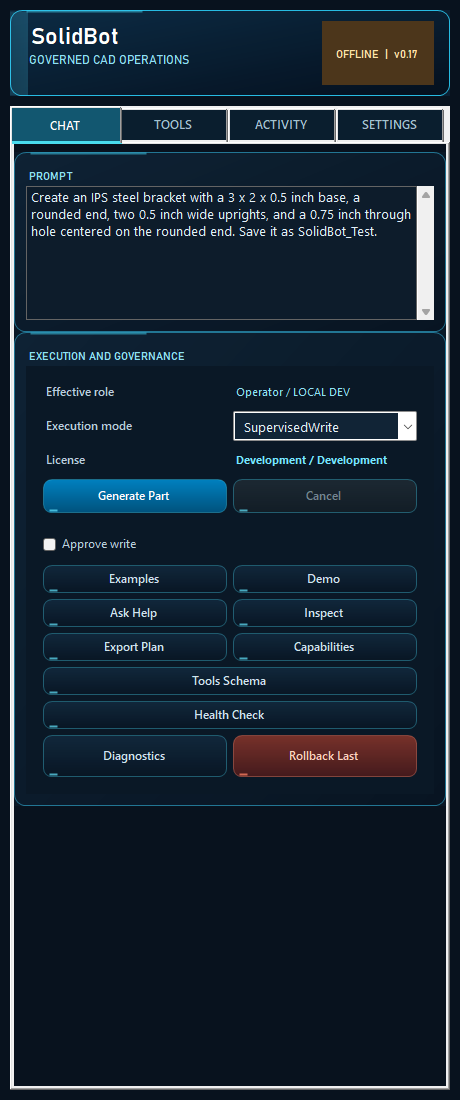
SolidBot: a Worked Example in SOLIDWORKS
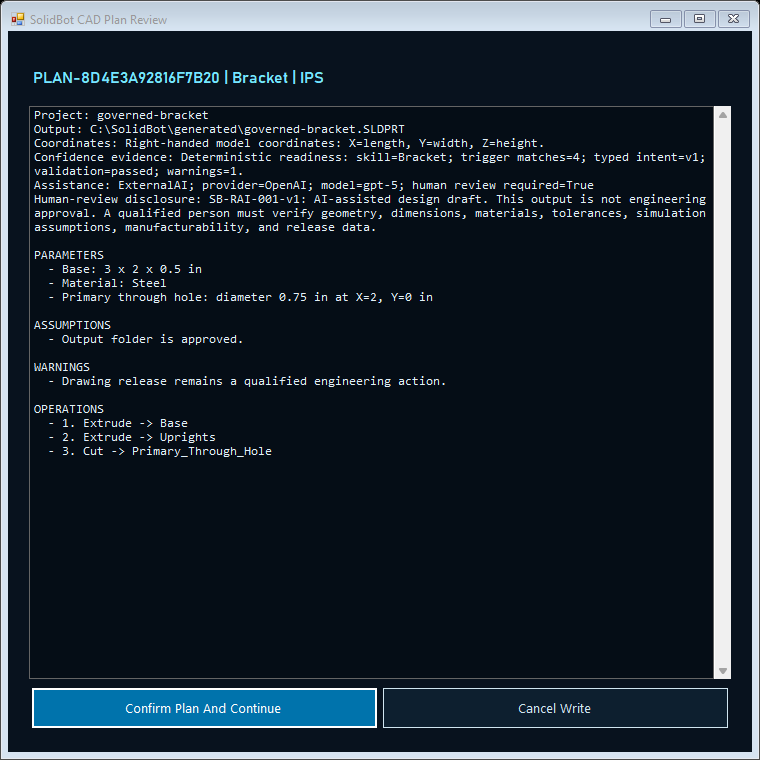
SolidBot is a native C# task pane add-in that turns plain-English requests into verified CAD operations: creating parts, editing models, detailing, patterning, measuring, drawing, assembling and exporting. It exposes 139 governed chat commands, and 192 governed tool descriptors on its MCP surface, of which 111 change the model and 118 are approval-gated.
The engineering effort went into not overstating what happened. A change is applied, then read back from SOLIDWORKS and compared against what was asked for; if the read-back disagrees the change is rolled back and reported as failed rather than as a success with a warning. Writes run inside a rollback checkpoint. A request it has no command for is refused, with the nearest real commands named, instead of quietly building something else. The multi-step planner is deterministic and runs with no AI provider configured at all.
Status, stated plainly: it is built and working, with 27 of 28 certification suites green against live SOLIDWORKS 34.1.1, and it is not commercially released. Most of what remains is not code. It is a code-signing certificate, AI-provider terms, customer IT infrastructure and legal sign-off.