
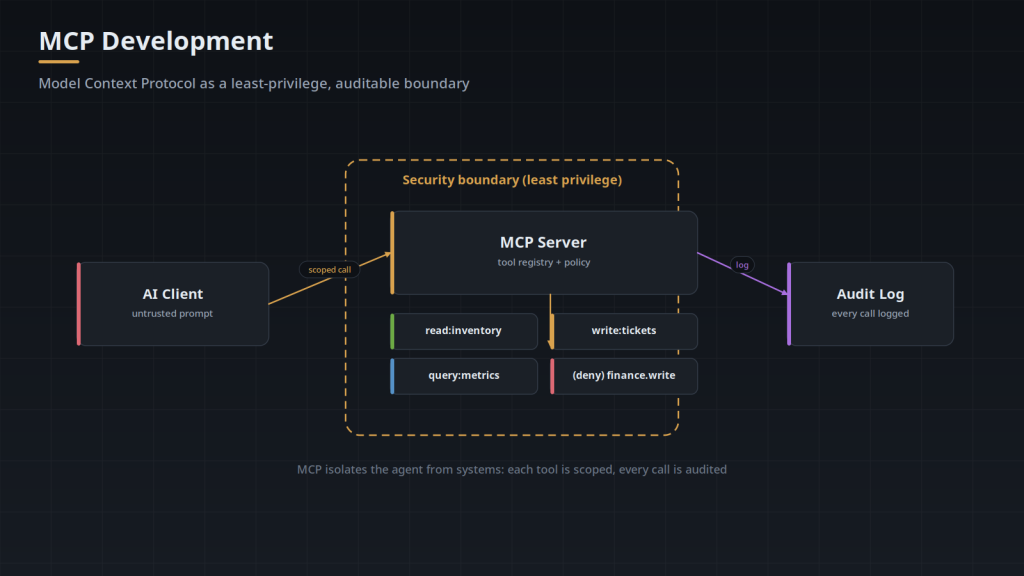
An MCP server is how an AI agent reaches your real systems — files, databases, APIs, internal tools. That makes it one of the most powerful things you can give an agent, and one of the most dangerous if you build it carelessly. An MCP server is a security boundary. Treat it like one. Here is the checklist we run on every one we build.
1. Expose the Least, Not the Most
The instinct is to expose a broad, flexible tool — “run any query,” “call any endpoint.” Resist it. Each tool should do one specific, bounded thing: get order status, not query the database. The narrower the tool, the smaller the blast radius when something — a prompt injection, a bug, a confused model — tries to misuse it.
2. Start Read-Only
Ship the first version with no ability to change anything. Let it read, query, summarize, and recommend. Add write capabilities later, one deliberate action at a time, each with its own permissions and approval. Most of the value of an agent shows up in read-only work anyway — and you learn how it behaves before you give it the ability to break something.
3. Authenticate the Transport
The connection between the agent and the MCP server must be authenticated and encrypted. An unauthenticated MCP endpoint on your network is an open door to whatever it exposes. Use proper credentials or tokens, rotate them, and never bake them into client-side code.
4. Validate Every Input
The arguments an agent passes to a tool are untrusted input — the model can be manipulated into sending hostile values. Validate types, ranges, and formats at the server, exactly as you would for a public API. A tool that takes a file path is a path-traversal risk; a tool that takes a query fragment is an injection risk. Assume the caller is adversarial.
5. Enforce Permissions Server-Side
Access control belongs on the server, not in the prompt. “Only answer for data this user can see” is not a rule you can trust the model to follow — it is a rule the server must enforce, on every call, based on the acting user’s real permissions. If your MCP server does not know who it is acting for, it cannot protect anything.
6. Log Everything the Agent Does
Every tool call, its arguments, its result, and the identity behind it should be logged. When something goes wrong — or when an auditor asks — you need to reconstruct exactly what the agent did and why. Audit logs are not optional for anything touching real data.
7. Gate Consequential Actions With Human Approval
Anything irreversible or expensive — sending money, deleting records, emailing customers — should require explicit human sign-off before it executes. The agent proposes; a person approves. This one control prevents the majority of “the AI did what?” incidents.
8. Test the Ways It Fails
Before production, probe it: can a prompt injection make it call a tool it should not? Can a malformed argument crash it or leak data? Can user A get a result sourced from user B’s data? These are not hypotheticals — they are the standard failure modes of agent infrastructure, and they should be tested deliberately.
Build It Like Infrastructure, Review It Independently
An MCP server is production security infrastructure, and it deserves an independent look. Software Depo builds MCP servers to this checklist; for a separate security assessment, our sister practice BulletproofSoft reviews AI and MCP deployments — a different team, by design.
Tell us what systems your AI needs to reach and we will design the server — and the security model — around them.
Transport Decides What Authentication Can Mean
MCP defines two transports, and control 3 lands differently on each. With stdio, the client launches the server as a child process and talks to it over stdin and stdout. There is no listener, no port, and no network hop to encrypt; the trust boundary is the process boundary, and the server runs with whatever environment the client handed it, which in practice is the developer's own file system rights plus any key sitting in the client config file. The specification's guidance for stdio is to take credentials from the environment rather than run an authorization flow. With streamable HTTP the server is a reachable endpoint, and every request has to carry and prove an identity of its own.
For HTTP the specification builds on OAuth 2.1 and treats the MCP server as a resource server rather than an authorization server. The server publishes protected resource metadata (RFC 9728) naming the authorization server that issues its tokens, and a client discovers that from the WWW-Authenticate header on a 401. The part most often skipped is the audience check. A server must not accept a token that was not issued for it, even a valid, unexpired token from an issuer it trusts, because a token minted for some lower-value service can then be replayed at the MCP server and inherit everything the MCP server can reach. Resource indicators (RFC 8707) exist so a caller can request a token bound to a specific resource; verifying the signature is not the same as verifying the audience.
Tool Definitions Are Part of the Attack Surface
Tool names, descriptions and JSON Schemas are not metadata sitting in a registry. They are placed in the model's context window, which makes whoever writes them an author of part of the prompt. Text in a description that reads like an instruction gets treated like one. Because the client merges the tool lists of every connected server into a single list, a description supplied by one server can shape how the model calls a different server's tools in the same session.
A tool list is also mutable at runtime. A server can notify the client that its tools have changed, and the new definitions take effect without the approval step the user went through when the connection was first added. A server that behaved during review can present different descriptions a week later, which is why review has to attach to the definitions rather than to the vendor.
- Record the tool names, descriptions and schemas you reviewed, and compare them on connect. A changed description is a change to your prompt, and it deserves the handling a code change gets.
- Declare only the server capabilities you actually implement. A server advertises tools, resources, prompts, logging and completions during the handshake, and each one is a surface a client will exercise. Sampling and elicitation are client capabilities rather than server ones, and a client that offers sampling or elicitation gives every connected server another path into the session.
- Namespace tool names by server. When two servers both expose something called search, an approval prompt or a log line showing only the tool name tells an operator nothing about where the call went.
- Treat renames as breaking. A client holds the tool list it fetched at connect time, so a tool renamed or repurposed on the server can still be attempted under its old name by a session that has not reconnected.
Exfiltration Is a Property of the Session, Not the Server
The condition that turns an agent session into a data loss event is the presence of three things at once: access to private data, exposure to content an attacker can influence, and any channel that carries data outward. Two of the three is usually survivable. All three in one context window is not, because the untrusted content can direct the model to pull the private data and push it through the outbound channel, and the model is doing only what the tools it was given permit.
For MCP the useful correction is that the three do not have to come from one server. A read-only server holding customer records, a fetch tool from a second server, and a support ticket the agent was asked to summarize combine into an exfiltration path across a session in which every individual server passed its own review. The outbound channel is usually the piece nobody counted: a markdown image URL in a tool result that the client renders, a search argument that reaches a third party verbatim, an error string written back into a shared ticket. Draw this boundary at the session by deciding which servers may be connected together, because no single server can enforce it alone.
Identity Has to Survive the Hop
Control 6 asks for the identity behind each call, and the field that usually ends up there is the credential the server presented downstream, which is the same value on every line. What makes a log answerable is three separate fields: the human principal, the agent session, and a per-call id that ties a request to its result and to any downstream call it caused. Redaction rules belong in the same commit as the first log write, because tool arguments are where secrets and personal data travel; a token passed as an argument or a customer record inside a search string is written verbatim otherwise. A log that a model will later read is also an injection surface of its own, since hostile text that arrived in an argument last week returns to a context window the moment someone asks an agent to summarize activity.
Identity is not only a logging problem. A call crosses at least three authentications: the agent client authenticates a person, the MCP server authenticates the client, and the target system authenticates the MCP server. Nothing carries the first of those to the third by default. The identity the caller presents has to be translated into an identity the target system already recognizes, and there are only a few honest ways to do that.
- Token exchange. RFC 8693 lets the server trade the caller's token for a downstream token scoped to that same user, so the target system sees the person rather than the integration.
- Enforcement where the data lives. Row-level security, or a connection opened under the user's own database role, keeps isolation in the system of record. Filtering inside tool code puts it in the layer most likely to carry a bug.
- Per-user stored credentials, for target systems that cannot accept a delegated token. Hold them in a secret store keyed by user rather than one shared entry, so removing one person's access does not mean re-issuing everyone's.
Design the Failure Path for a Caller That Retries
Agents retry, and they retry differently from a client library. A model that receives an error, a timeout, or a truncated result will frequently call the tool again with slightly reworded arguments, having no way to know whether the first call already took effect. On a read tool that costs tokens. On anything with a side effect it produces duplicates: two tickets, two messages, two transfers. Give side-effecting tools an idempotency key, either supplied by the caller or derived from the arguments, and have a repeated key return the original result instead of acting a second time.
Errors and cancellation are the other half of that path. Error text becomes model input, so a stack trace or a raw database message goes into the context window and can be summarized onward into a transcript or a ticket; return a short typed error saying what failed and whether retrying can help, and nothing about internal structure. Cancellation has the same shape. A client can cancel an in-flight request, but that only tells the server to stop reporting, and work already started downstream is not canceled by it. Decide per tool whether a canceled request should attempt compensation or simply be recorded as unknown.
Frequently Asked Questions
What does the MCP specification actually define, and what does it leave to us?
It defines a JSON-RPC 2.0 message layer, an initialize handshake in which client and server declare capabilities, and the server primitives: tools the model can invoke, resources the client can read, and prompts a user can select. It does not define your authorization policy, your data retention, your rate limits, or what any tool is permitted to do inside your systems. All of that lives in the server implementation, which is why two servers built to the same specification can carry completely different risk.
Do we install an MCP server or build one?
Both exist. Published servers cover common systems such as file systems, source control, issue trackers and general-purpose databases, and connecting one of those is configuration rather than development. Anything that reaches a system carrying your own business rules tends to be written, because the substance is in which operations exist and in whose name they run, and that is specific to your data model. A published server is still code executing with your credentials, so it belongs in the same review as one you wrote.
Where does an MCP server run?
A stdio server runs as a child process of the agent client, on the same machine, started and stopped by that client and inheriting its environment. An HTTP server is deployed like any other internal service: a container or VM, TLS terminated in front of it, a hostname the clients can resolve. Most implementations use the Node.js or Python SDKs, but the protocol is JSON-RPC over a stream and requires neither.
What has to already exist for the server to act as a specific user?
Two things: an identity the server can receive and verify, usually a token from your identity provider that names the end user, and a target system that can be addressed on that user's behalf through a per-user API, a delegated token, or a database role that maps to the person. Where the target system offers only one shared credential, the server still has to know who is calling, but the isolation then has to be implemented in tool code instead of enforced by the system of record. That is a design constraint worth establishing before the tools are written rather than after.
How does a client actually connect to the server?
The client is configured with either a command and arguments to launch, for stdio, or a URL, for HTTP. On connection the two exchange an initialize message declaring protocol version and capabilities, the client requests the tool list, and from that point those tools appear in the model's context for the session. There is no registration step and no central directory. The client's configuration is the entire trust decision, so who can edit that configuration matters as much as what the server does.
Can one server handle several clients at once?
An HTTP server can. Streamable HTTP supports concurrent sessions, each identified by a session id issued at initialization, so one deployment serves many clients. A stdio server is one process per client by construction. The common failure when a stdio server is redeployed as a shared HTTP endpoint is state held in module-level variables, such as a cached connection, a current user, or a last result, all of which were safe while the process belonged to a single caller and become cross-session leaks once it does not.
Does the server need to be reachable from the internet?
Usually not. When the agent client runs inside your network, the server can live on a private address with no public route at all, which removes a class of exposure without any change to the code. Public reachability becomes necessary when the client is a hosted product you do not operate, and at that point the server is a public API, so the audience and metadata behavior described above stops being optional. Network placement is worth deciding deliberately rather than inheriting it from wherever the code happened to be deployed.