

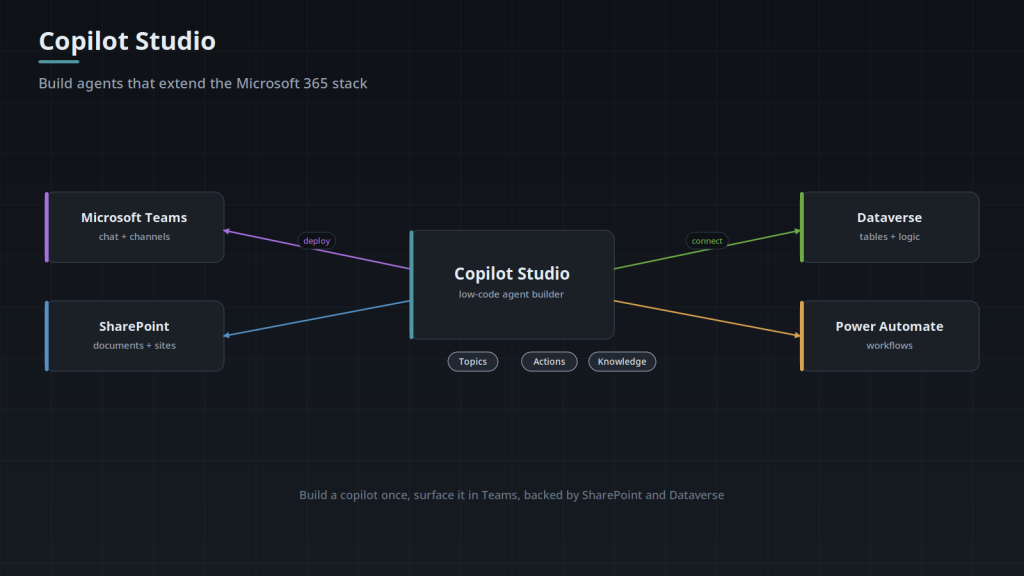
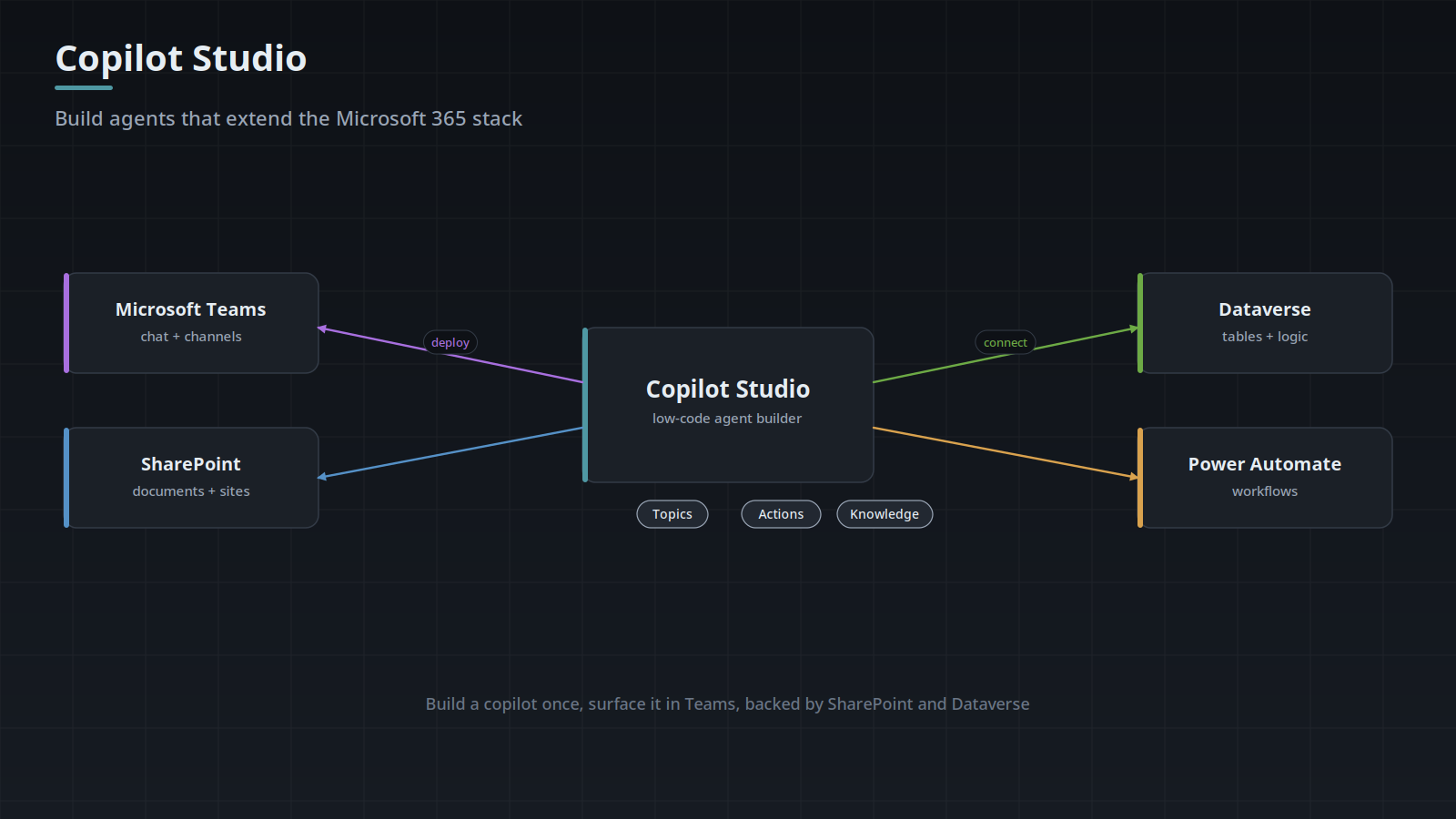
Microsoft Copilot Studio development is the fastest route to a governed AI agent for organizations already living in Microsoft 365. Software Depo builds custom Copilot Studio agents that answer from your SharePoint and Microsoft 365 knowledge, act through Power Platform, and deploy into Teams — with the authentication and governance your IT team requires.
Why Copilot Studio
If your data, identity, and users already run on Microsoft 365, Copilot Studio lets an agent inherit that ecosystem — Entra ID sign-in, SharePoint content, Dataverse records, and Teams delivery — instead of rebuilding it. That is a real head start on both time and governance. Where Copilot Studio hits its limits, we extend it with custom connectors or move the workload to a custom agent, and we will tell you honestly which path fits.
What We Build
- Custom Copilot Studio agents grounded in SharePoint and Microsoft 365 knowledge
- Dataverse and Power Platform connections; Power Automate workflows for actions
- Custom connectors to line-of-business systems Copilot Studio does not reach natively
- Teams deployment with the right security groups and access controls
- Authentication, DLP, and governance aligned to your Microsoft tenant policies
- Agent testing, guardrails, and an improvement loop after launch
Microsoft 365 Agent Patterns
Most Copilot Studio requests we see fall into a handful of recognisable shapes:
- SharePoint AI agent — answers from document libraries and site content, respecting the permissions each user already has, so nobody sees a summary of a document they could not open themselves.
- Teams AI agent — the agent lives where people already work; no new tool to adopt, no separate login to remember.
- Microsoft 365 Copilot agent — extends Copilot with your organisation’s own knowledge and actions rather than general capability alone.
- Power Automate integration — the agent triggers real workflows: raising a ticket, starting an approval, updating a record.
- Copilot governance — scoping, DLP alignment, audit, and the policy work that decides whether IT will actually let the thing into the tenant.
We work as Copilot Studio consultants and developers — scoping the use case, building the agent, and handing over something your team can maintain. Where an assessment is the right first step rather than a build, we will say so.
In the Field: An Enterprise Knowledge Assistant
We are currently configuring an internal knowledge assistant for a large banking company, deployed in Microsoft Teams and grounded in approved SharePoint content — standard operating procedures, internal standards, job documentation, training material, and departmental knowledge.
The design goals are instructive, because they are the ones that matter in a regulated environment:
- Department-specific knowledge scopes — a question from one team is answered from that team’s approved material, not from everything in the tenant.
- Source-linked responses — every answer identifies the document behind it, so a person can verify before acting.
- Permission-aware access — the agent never becomes a way to read something your account cannot.
- Refusing to guess — when the approved content does not cover a question, saying so beats producing a confident, unsupported answer.
- Knowledge-gap feedback — unanswered questions become a list of documentation worth writing.
Status: pilot and configuration stage. That last design goal tends to surprise people: a well-built internal assistant is also a survey of where your documentation is thin, and that finding is often worth as much as the assistant itself.
Governed From Day One
An agent inside your tenant can see a lot — so we scope what it can access, respect the permissions users already have, log what it does, and test for the ways it could answer from the wrong place. Governance is part of the build, not a review afterward. For independent security assessment, our sister practice BulletproofSoft reviews agent deployments.
Tell us what you want the Copilot to do — the knowledge it should draw on, the actions it should take, and who should use it. We will scope it against your Microsoft 365 environment.
Related services
- AI Workflow Automation — Copilot as one part of a workflow: AI workflow automation.
- AI Adoption and Employee Training — Getting staff to actually use it: AI adoption and training.
How the Agent Actually Finds an Answer
A Copilot Studio agent does not read your documents at question time. It turns the user's message into one or more search queries, retrieves passages from the knowledge sources you configured, and passes those passages to the model as context along with your instructions. The answer is generated from what came back, which is why the shape of the library and the quality of retrieval decide the output far more than the wording of the instructions. Under generative orchestration the same mechanism selects actions: the model reads the name and description of every topic and action available to it, and picks from those strings.
Retrieval only works on text the service can extract. A scanned procedure saved as an image-only PDF has no text layer, so it contributes nothing no matter how central it is, and a table pasted into a document as a screenshot is invisible in the same way. Long documents are chunked before indexing, so a figure that only makes sense with a heading three pages above it can be retrieved without the qualification that made it correct. Both problems are fixed in the library, not in the agent.
The knowledge sources themselves are not interchangeable. SharePoint and OneDrive content is queried through Microsoft Graph search executed as the signed-in user; uploaded files are stored with the agent, and anyone who can chat with it can reach their contents. The differences that catch people out sit below that:
- SharePoint and OneDrive: answers come from the search index rather than the live file, so a document edited or re-permissioned minutes ago can still be answered from the previously crawled copy until indexing catches up.
- Uploaded files: the copy is captured at upload time and never tracks the original, so a corrected procedure means uploading the new version and removing the old one.
- Public websites: this source is served from a public web index, so anything behind a login, a paywall, or a noindex directive returns nothing, including your own customer portal.
- Dataverse: retrieval runs over selected tables and their columns, which suits record lookups and does not substitute for a report when the question is really an aggregate.
- Microsoft Graph connectors: external content indexed into the tenant's semantic index carries whatever access control the connection was configured to map, so permissions there are modeled by you rather than inherited.
The Power Platform Substrate You Inherit
The agent is a Power Platform solution component, and it inherits everything about the environment it is created in: the Dataverse database that holds its conversations and uploaded files, the region that environment was created in, the data loss prevention policy that applies to it, and the list of people who can edit or publish it. Choosing the environment is a governance decision made once and awkward to reverse.
Data loss prevention policies sort connectors into business, non-business, and blocked groups, and connectors from different groups cannot be combined in the same flow or agent. A policy set at tenant level by an administrator who has never heard of your project can therefore stop a planned action from working, and the symptom is an action that is simply unavailable rather than an error that explains itself.
Moving work between environments is done with solutions. Connection references and environment variables exist so that the site, endpoint, or account a flow points at is supplied per environment instead of being baked into the flow, and skipping them is the usual reason a promoted agent reaches production still pointing at test data.
Settle these before anything is built:
- Which environment the agent lives in, and which region that environment was created in, since region is fixed at creation and changing it means building the environment again.
- Whether that environment has Dataverse provisioned, which agents require.
- Whether the agent authenticates each user with Entra ID or runs under a single service identity, because only the first preserves per-user permission trimming.
- Who owns the agent, so that it does not become an orphan when the person who created it changes roles.
- Who may edit it, who may publish it, and who may read conversation transcripts, which are three separate permissions and often belong to three different groups.
Actions, Connectors, and What the Model Actually Reads
A custom connector is defined by an OpenAPI 2.0 (Swagger) description plus an authentication definition, and Copilot Studio calls its operations as actions. An MCP server can be added as a tool instead, in which case the server advertises its own tool list at connect time rather than the definition being pinned in a file someone has to maintain. The practical difference is maintenance: a connector has to be re-imported when the upstream API changes its surface, an MCP server does not.
Under generative orchestration, the summary and description fields on each operation are not documentation. They are the only thing the model uses to decide whether to call it and what to put in each parameter. An action called Post Item with an empty description will be skipped or fired on the wrong turn, and a parameter described as id gives the model nothing to fill it with. Rewriting those strings in plain language, including a sentence on when not to use the action, changes behavior more than most edits to the agent's overall instructions.
Write actions deserve different treatment from lookups. A retrieval that returns the wrong passage produces a bad sentence; an action that raises a ticket, starts an approval, or updates a record produces a real object somebody has to unwind. Anything that writes should echo the parsed parameters back to the user before it runs, and should be idempotent or key-checked wherever the same request can arrive twice, because a model that does not see a clear result will try again.
Failure Modes and the Test That Separates Them
Slow answers have their own causes and are worth separating from wrong ones. Retrieval across many large sources, a chain of actions where each call waits on the one before it, and a connector fronting a slow legacy system all present identically in the chat window as a spinner. Run history on the flow and the connector shows which segment consumed the time, and where the answer is the upstream system, no amount of work on the agent will change it.
Wrong answers are harder, because several distinct causes look the same to the person who reported the problem. Guessing between them turns a short correction into a long one. Run the cheap tests first, because the first two eliminate most cases and neither of them touches the agent:
- The content was never in a configured source. Search the same phrase in SharePoint yourself, signed in as the user who complained. If search returns nothing, the refusal was correct and the fix is a document, not a setting.
- The content exists but that user cannot open it. Ask someone with broader access the identical question. Two different answers to one question is a permissions result, not a model result.
- The document is present but not machine-readable. Open it and try to select the text. If you cannot, neither could the indexer.
- Retrieval succeeded and the answer is still wrong. Follow the citation. If the cited document really does say what the agent said, the correction belongs to the document owner.
- The action never ran. Check the flow's run history. No run at all means the agent never decided to call it, which is an instruction and description problem; a failed run points at the connection, the payload, or the upstream system.
When a Copilot Studio Agent Is Not the Right Build
One condition is worth separating from the rest. If nothing has been approved in writing at all, and the procedures live only in the heads of the people who run them, there is nothing to ground against and the writing has to come first. That is a different case from a library that is thin in places, which is a normal starting condition.
The remaining conditions point away from Copilot Studio specifically, usually toward a custom agent:
- The people who need it are not in your tenant. External customers and contractors signing in with their own identities get nothing from inherited Entra ID sign-in, which removes most of the reason to choose Copilot Studio.
- The answer has to be computed rather than found. Eligibility rules, pricing math, and anything where a plausible wrong number is worse than a refusal belong in deterministic code behind a form.
- You need control over the retrieval pipeline itself: your own chunking, your own embedding model, a reranker, a model version pinned for reproducibility. Copilot Studio deliberately does not expose those.
- The real question is a query, not a document lookup. How many open items sit in the Southeast region is answered more reliably by a report over the data than by retrieval over prose about the data.
- The volume is a few questions a week from one team. A well-placed page and a pinned Teams post cost nothing to run and nothing to govern.
- Every response has to be reviewed by a person before the requester sees it. That is an approval workflow with a queue, not a chat agent.
Frequently Asked Questions
Is Copilot Studio the same thing as Microsoft 365 Copilot?
No. Microsoft 365 Copilot is a product that sits inside Word, Outlook, Teams, and the rest of the suite. Copilot Studio is the authoring environment where a specific agent is built with its own knowledge, instructions, and actions. An agent built in Copilot Studio can be surfaced inside Microsoft 365 Copilot or published on its own to Teams or a website, and licensing differs by where you publish, so the destination is worth deciding before the build rather than after.
What has to already exist in our tenant before a build starts?
Entra ID identities for the intended users, a Power Platform environment with Dataverse in the region you want, and the content itself in SharePoint with its permissions in the state you actually intend. That last point matters more than it sounds: an agent that respects existing permissions also inherits existing permission mistakes, so an over-shared library becomes an over-sharing agent. You also need an administrator who can approve the app and the connectors, since publishing into Teams is not something a maker completes alone.
Can the agent reach systems that are not Microsoft?
Three things have to be true of the target system. It has to expose an HTTPS endpoint, it has to support an authentication scheme the connector framework can carry (API key, basic, or OAuth 2.0), and the connector has to be permitted into the same DLP group as the others the agent uses. Where a system offers only a desktop client or a proprietary protocol with no network API, there is nothing to connect to, and the workable route is a small service that fronts it and exposes the few operations you need.
How does deployment into Teams actually proceed?
Publishing the agent and making it available in Teams are two separate steps, which is why published it and nobody can see it is such a common report. After publishing, the agent is submitted as a Teams app, then a Teams administrator approves it and sets who it is available to, normally a security group rather than the whole organization. Members of that group add it like any other app, and the first message triggers a sign-in that establishes the identity used for permission-trimmed retrieval.
Can Copilot Studio run on-premises, or reach systems that are?
Copilot Studio is a cloud service and has no on-premises deployment. Systems inside your network are reached through the on-premises data gateway, installed on a machine that can see them, which makes outbound connections over 443 to Azure Service Bus, so no inbound firewall rule or public endpoint is needed. The gateway machine then becomes part of the dependency chain, so its patching, its restarts, and the account its connections run under all affect the agent.
What do you decide, rather than us?
The scope of the knowledge, meaning the list of sites and libraries whose content counts as approved and which material each audience should be answered from. The actions the agent may take, and specifically which of them are allowed to write anything. The initial audience and the conditions for widening it. And who owns the agent after handover, since it is a living configuration rather than a finished file.
How do we know it works before we let people use it?
Write the test questions before the build, taken from ones people actually ask, each with a known correct answer and the document it should cite. Run them from an account in each permission scope, and check the citation rather than only the answer, because a right answer drawn from the wrong source will drift later. Generated responses vary between runs, so a question that passed once is not proof; the most informative questions are the ones the library does not cover, where the correct behavior is to say so.